
Best GPS Tracker for Elderly Parents Who Still Drive (2026)
-
01
The best GPS tracker for elderly parents depends on driving habits, wandering risks, and safety needs.
-
02
Car GPS trackers provide real time location updates, geofence alerts, and driving activity for elderly drivers.
-
03
Wearable GPS trackers can help dementia patients who wander away from home or leave safe zones.
-
04
Battery life, tracking accuracy, SOS alerts, and subscription costs should guide your tracker choice.
-
05
Choose a tracker your parent can use comfortably, understand easily, and keep securely attached.
Finding the best GPS tracker for elderly parents gets serious when your dad drives home late, doesn't answer his phone, and you start wondering where he is.
I've seen this concern come up again and again. Your parent may still drive perfectly well, but one missed call can send your mind in ten different directions. You don't want to take away their independence. You want a way to check their location when something feels off.
A GPS tracker can give you that extra visibility with real time location updates, geofence alerts, and driving information. The hard part is choosing one that fits your parent, their car, and their routine.
In this guide, I'll compare car and wearable trackers, covering tracking speed, battery life, accuracy, alerts, costs, and my real-world testing. By the end, you'll have a clearer idea of which tracker fits your family.
As an Amazon Associate, Konnect GPS earns from qualifying purchases.
What Is The Best GPS Tracker For Elderly Parents?
The best GPS tracker for elderly parents depends on one question, whether your parent still drives. For driving, a plug-in car GPS tracker like Konnect provides real time location, geofence alerts, and no charging. For wandering, a wearable GPS tracker with an SOS button and fall detection makes more sense.

Come on, you know which one your parents are. Many families who call me have a dad who still drives to the hardware store every Saturday. Keeping tabs on that car is the part you can control, so pick your branch below.
If Your Parent Still Drives, Get A Car GPS Tracker
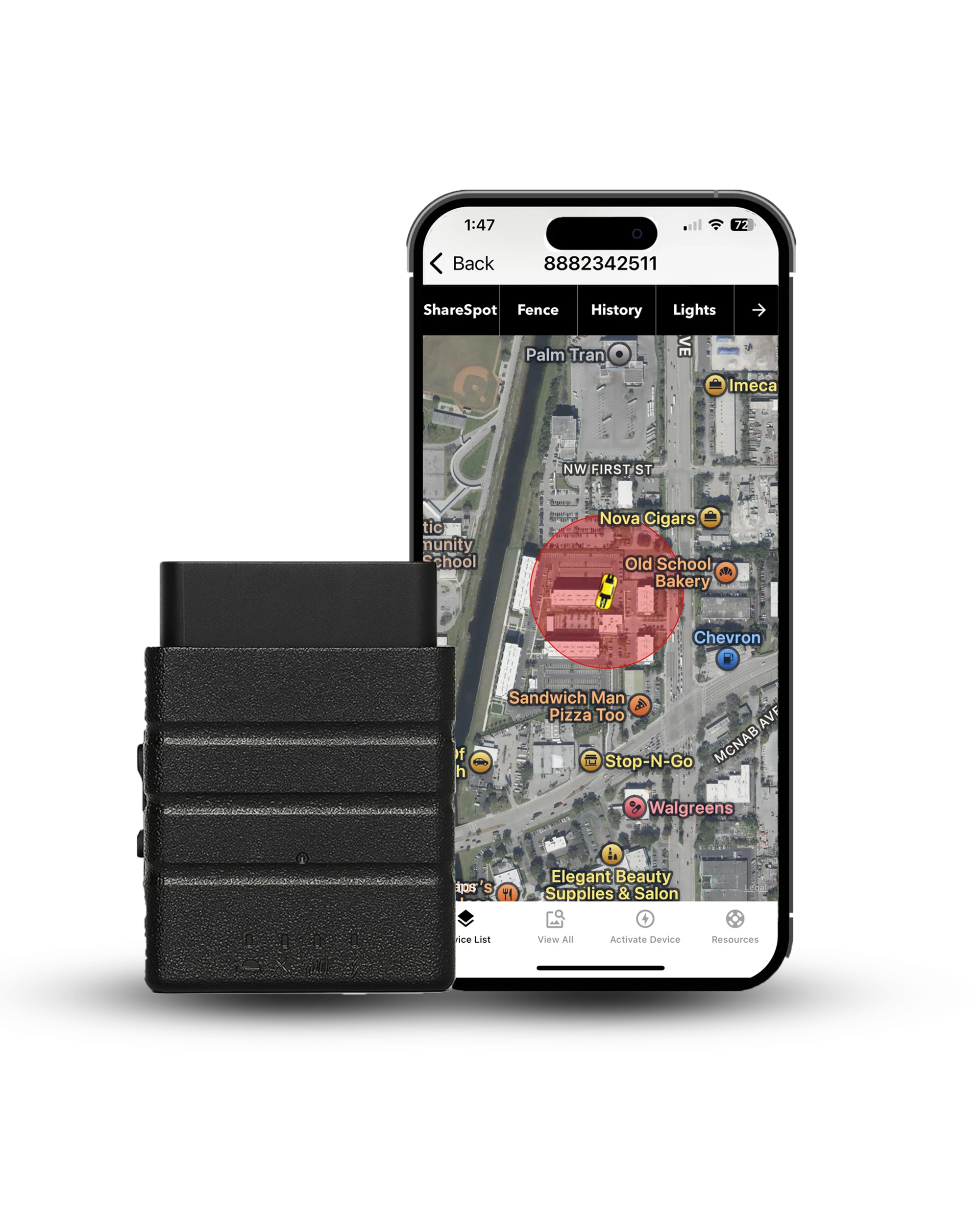
A car GPS tracker like Konnect plugs into the OBD2 port and reports the car's location every 3 seconds. That is super fast, and really what you want if you are worried about an elderly family member. That is what we did with my Grandpa. Below is an image of my Grandpa Mike, a proud World War 2 veteran who drove independently well into his late 80s!

Our family was able to collectively view my Grandpa's location via phone, and could watch his old van move along when he would drive around Grant's Pass, Oregon. And yes, we caught him going to the Wonder Bur and Seven Feathers casino way more times than he said he went. Most other vehicle trackers report less often, so a wrong turn can take longer to appear. The Konnect OBD2 GPS tracker draws power from the car, so your parents don't have to remember another device. In fact, my Grandpa never even noticed it in his Dodge Caravan.

Safe zones around home, church, or the doctor's office can send an alert when the car leaves. Trip history also gives family members a record of where the vehicle has been.
That covers the car. Once your parents step out, a wearable GPS tracker becomes more useful.

- Updates every 3 seconds: live location while the car moves.
- $8.95 a month: no contract.
- Lifetime warranty: with USA-based support.
If Your Parent Wanders On Foot, Get A Wearable GPS Tracker For Dementia
A wearable GPS tracker for dementia stays with the person instead of the vehicle. Wandering creates a different safety concern, especially for dementia patients who may become easily confused or forget where they are.

Four wearables come up often in dementia care, and each one fits a different situation.
- 01AngelSense works well for someone who removes tracking devices. A locking fastener helps keep the device attached, while two-way voice lets caregivers talk through it.
- 02GPS SmartSole hides inside a shoe insole for someone who won't wear a watch or pendant.
- 03Greenlight Safe Seniors includes fall detection and an SOS button, with up to 30 days of battery life.
- 04Jiobit uses a small clip-on design and lets multiple caregivers share the same live location.
People living with dementia who will wander at least once, which is why safe zones and real-time alerts belong in the plan.
Verified against the Alzheimer's Association, wandering and getting lost
Wearables require charging and a monthly subscription. AngelSense and SmartSole need more frequent charging, so build that job into the care routine.
Many families use a car tracker and wearable together. One follows the vehicle. The other follows the person.
RELATED READING Can AirTag Be Used for Dementia Patients? Read moreGPS Trackers For Elderly Drivers At A Glance
| Comparison |
 Konnect Konnect
|
 Bouncie Bouncie
|
 MOTOsafety MOTOsafety
|
 PAJ Finder PAJ Finder
|
 SpaceHawk GPS SpaceHawk GPS
|
|---|---|---|---|---|---|
| Best for | Best overall | Crash detection | Driving report cards | SOS button in the car | Magnetic and waterproof |
| Update Rate | Every 3 seconds | Every 15 seconds | Once a minute | Not published | 3 seconds |
| Battery Life | Vehicle Powered | Vehicle Powered | Vehicle Powered | Up to 3 weeks | 1 to 3 weeks |
| Costs | ~$39.95 + $8.95/mo Plan | ~$89.99 + $9.65/mo Plan | ~$69.99 + $25/mo Plan | ~$44.99 + $13/mo Plan | ~$39.95 + $9.95/mo Plan |
| Buy Now | Buy on Website | Buy on Amazon | Buy on Amazon | Buy on Amazon | Buy on Amazon |
How I Tested GPS Tracking For Elderly Drivers
I've spent 15+ years putting GPS tracking devices on vehicles. For this guide, I focused on five trackers that make sense for a parent's car, including plug-ins, magnetic units, and battery-powered options. Most of my testing happens in Southern California around Murrieta and Temecula in Riverside County.

My test vehicle is a 2017 Nissan Pathfinder, and my regular route runs from Murrieta to San Diego, with trips toward Los Angeles when needed.
I used the same five checks for every tracker.
- Update speed at 70 mph on the 15, including how closely the location follows the road
- Geofence alerts, from leaving my driveway to the alert reaching my phone
- Family location sharing on both iPhone and Android
- GPS lock after leaving a garage and reconnecting with GPS satellites
- Heat and battery performance during a full week in a 100°F-plus cabin
This summer, Konnect and Bouncie covered the full route plus everyday stops at the grocery store, church, pharmacy, and home. Riverside County heat also puts electronics through a tough test.
The five that did are below, in order.
1. Konnect OBD2 GPS Tracker: Best Overall For Elderly Parents Who Still Drive
Konnect is a plug-in car GPS tracker that lives in the OBD2 port and sends live updates every 3 seconds. Most trackers report once a minute.
That speed makes it the best overall choice, because a wrong turn shows up on your map while it's happening. Geofence and speed alerts arrive as push and email, and a full year of trip history stays in the app. A tamper alert fires if someone unplugs it, and nothing ever needs charging.
Best for the family with a parent who still drives and a sibling group that wants one shared login.
Key Features: Six Numbers To Know Before You Buy
- 3-second updates, real time location tracking where most trackers report every 60.
- ~6 feet accuracy, so the dot sits on the right street.
- 12 months of trip history on every plan, every trip and stop.
- Unlimited geofences per tracker, with speed alerts sent by push and email.
- 15-minute backup battery keeps reporting after an unplug, with a tamper alert.
- Lifetime warranty, US phone support Monday to Friday, email seven days.
Konnect Pros And Cons
- Fastest updates of any tracker on this list
- Nothing to charge, ever, for anyone
- Full year of history, no paid tier
- Tamper alert plus 15 minutes of backup
- Real people in the USA on the phone
- Tracks the car, not the person on foot
- Location first, no crash sensor built in


On the Pathfinder, Konnect kept the location dot tight to my actual route. At 70 through the Temecula grade, it stayed on my side of the freeway instead of cutting across the road. The 3-second updates made turns and exits show up quickly on the map.
The geofence I drew around my driveway in Murrieta pinged my phone before I reached the end of the street.
What I appreciate most is the speed and the year of trip history that was just as useful. I could scroll back to last Tuesday and see the trips and stops. I plugged Konnect into the OBD2 port once and never had to charge it.
2. Bouncie: Best GPS Tracker For Crash Detection

Bouncie is the other plug-in on this list. I'd point you to it if crash detection is the feature you can't skip. An accelerometer inside the plug senses an impact and sends an alert with the car's location to your phone.
Konnect doesn't do that. Updates come every 15 seconds, and the app is easy to share with siblings. Every plan includes three roadside calls a year through Agero. History runs 30 days and coverage stops at the US border. Best for a parent who drives alone and a family that wants an automatic alert if something goes wrong.
Key Features: Five Things You're Paying $89.99 For
- 15-second updates while the car moves, five times slower than Konnect.
- Crash detection with an instant alert and the car's exact location.
- 3 free Agero roadside assistance calls a year on every plan.
- 30 days of trip history, with speed, hard braking and acceleration events.
- $9.65 a month, no contract, dropping to $8.35 with three devices.
Bouncie Pros And Cons
- Only plug-in here with crash detection
- Roadside help built into the plan
- Simple app that siblings pick up fast
- Reads engine codes and battery voltage
- 30 days of history, not a year
- Continental US only, no international roaming
- Five times slower updates than Konnect
Bouncie ran the same Pathfinder loops as Konnect, so I could compare both trackers on the same roads. On the 15, the 15-second location dot sometimes sat a few hundred yards behind the car.
Around town, the tracking kept up well during regular stops and turns.
The feature I liked most was the crash alert. I tested the alert behavior and liked having that extra layer for a parent driving alone. If Dad hits something and can't call, Bouncie tells you. For a parent who drives alone, that added crash protection feature can justify the extra $50 on the device.
RELATED READING Bouncie vs Konnect OBD2 GPS Tracker Read more3. MOTOsafety: Best For Driving Report Cards

MOTOsafety is a plug-in OBD2 tracker built around a daily driving report card. MOTOsafety scores every trip on speeding, harsh braking and rapid starts. The card lands in your inbox each morning. A month of cards shows behavioral changes that one scary phone call never will, which is why it ranks here.
Location updates once a minute, and geofence and curfew alerts are included. But the plan runs $25 a month with no contract. MOTOsafety is best for the family that needs evidence for a driving-fitness conversation with a doctor, or with Dad himself.
Key Features: Things You're Getting With SOS Button
- Daily report card by email, scoring speeding, harsh braking and rapid starts.
- 60-second location updates, so the map refreshes once a minute.
- ~16 feet accuracy, or 5 meters, per MOTOsafety's published figure.
- $25 a month, no contract, no activation fee, cancel by phone.
- Geofence, speed and curfew alerts, plus a free teen driving course.
- US and Canada coverage on 4G, no electric vehicles supported.
MOTOsafety Pros And Cons
- Objective driving evidence, delivered every single morning
- Coaching course included with the plan
- Works in Canada as well as the US
- Curfew alerts catch late-night driving fast
- No contract and no activation fee
- Once-a-minute updates, twenty times slower
- No alert when the unit is unplugged
MOTOsafety took a different approach from the other trackers I tested. The daily driving report card was the feature I kept coming back to. Each morning, I got a summary of speeding, harsh braking, and rapid starts, making it easier to spot driving patterns over time.
The 60-second updates kept the map moving, while geofence, speed, and curfew alerts gave me extra checks during daily driving. The unplugged gap was the main limitation. If Dad pulled the OBD2 tracker, tracking alerts stopped until it was plugged back in.
At $25 a month, I'd use MOTOsafety when driving behavior needs a clear record for a family or doctor conversation.
4. PAJ Allround Finder 4G: Best For An SOS Button In The Car

PAJ Allround Finder 4G is a rechargeable tracker that rides in the glove box or a bag. The feature that earns its spot is the SOS button, backed by two-way voice messages. Press the button and every caregiver gets an alert with the location.
Dad can send "I'm fine, just lost" and you can answer. A 5,000 mAh battery runs about 20 days of everyday tracking. Geofence, speed and shock alerts arrive by push or email, and the SIM covers 100-plus countries.
Best for the parent who needs a button to press and a family fine with charging every three weeks.
Key Features:
- SOS alerts and two-way voice messages, sent by push or email.
- 5,000 mAh battery, about 20 days of use or 60 on standby.
- 100-plus countries on a multi-network SIM with no roaming surcharge.
- $13 a month, or $5.50 a month on a two-year Basic plan.
- 365 days of history on Premium, 3 days on the Basic tier.
Every pro below comes with a charging cable attached.
PAJ Pros And Cons
- Only tracker here with an SOS button
- Voice messages both ways, no phone needed
- Lowest monthly cost on a prepaid plan
- Lifetime device replacement while you subscribe
- Charging every three weeks or it stops
- Update interval not published by PAJ anywhere
- Basic plan keeps only 3 days
I kept the PAJ in the glove box and tested the SOS button to see how the alert behaved. One press sent the location alert, so I could see where the tracker was without needing Dad to make a phone call. The two-way voice feature worked the same way. I sent a message back and could respond without relying on a phone call.
The 5,000 mAh battery gave me roughly 20 days of everyday use, so I'd put charging on a three-week routine. The $5.50 Basic plan kept the monthly cost low. The one gap I noticed was the unpublished update interval, so I treated PAJ mainly as a location and SOS tracker.
5. SpaceHawk Mini: Best Waterproof Magnetic Tracker For A Parent Who Unplugs Things

SpaceHawk Mini is a compact, magnetic GPS tracker that works on cars, bikes, backpacks, jacket pockets, and other personal items. At about 2 inches, it slips into small spaces or attaches securely with its strong magnetic mount. Nothing plugs into the vehicle, so a parent can't accidentally unplug it.
The Mini reports every 3 seconds to 3 minutes, depending on the setting. SpaceHawk's IP67 rating helps protect it from rain and car washes. Battery life runs 1 to 3 weeks with normal use or 3 to 6 months in power-saving mode.
Best for, parents who may remove a plug-in tracker, families covering multiple vehicles, or seniors who need a portable tracker.
Key Features: Six Specs, And The Magnet Is The Least Interesting One
- 3-second to 3-minute updates, set from the app to save battery.
- IP67 waterproof, so rain, mud and car washes are no problem.
- 1 to 3 weeks per charge, or months in power saving mode.
- Built-in magnet holds on any steel surface, no tools, no wiring.
- Geofence and movement alerts, plus full trip history in the app.
- $19.95 a month, or $9.95 a month on a two-year plan.
Where the magnet earns its keep, and where the battery bites.
SpaceHawk Pros And Cons
- Goes on any vehicle, cart or trailer
- Same 3-second update option as Konnect
- Waterproof for wet Southern California winters
- Moves between cars in ten seconds
- Lifetime warranty and 30-day money back
- Needs recharging every 1 to 3 weeks
- No car power, so battery is everything


SpaceHawk Mini gave me plenty of placement flexibility during testing. The strong magnetic mount held firmly in place, while plastic, glass, and fiberglass didn't block the GPS signal. I also tested different mounting spots and got reliable tracking from each.
The 3-second update rate made the location refresh quickly when the car was moving.
I liked the movement alert, too. After sitting parked for a few minutes, the Mini went to sleep and woke up as soon as the car moved, sending a fresh location update. For a parent's car, that early alert is useful. I just had to remember the charging schedule.
RELATED READING OBD2 vs Magnetic GPS Tracker, which style fits your parent's car? Read moreFive picks, one plug-in I'd start with. The next section is the checklist behind those calls.
What Key Features Should A GPS Tracker For Seniors Have?
A GPS tracker for seniors should offer fast location updates, geofence alerts, reliable battery life, accurate GPS, and emergency features such as SOS or fall detection. The right mix depends on your parent's safety needs.
Let's look at each feature and see which ones you actually need.
1. Real Time Location Updates
Real time location updates every few seconds show a wrong turn while it's happening, not an hour later. The three plug-ins report at very different speeds.
- 3 seconds for Konnect and SpaceHawk, which is continuous monitoring in practice.
- 15 seconds for Bouncie, about a quarter mile between updates at 65.
- 60 seconds for MOTOsafety, a full mile between pings at freeway speed.
Your parent's cell phone won't get you there either. Apple's Find My and Life360 show where the phone is, and only while it's charged and sharing.

2. Geofence Alerts And Safe Zones
Geofence alerts notify caregivers when a tracker leaves a predefined safe zone.
You can create zones around home, church, a doctor's office, or another regular destination. Once the zone is active, real-time alerts can replace constant map checking. Speed alerts work in a similar way. Set a speed threshold and let the app notify you when the vehicle crosses it.
3. Battery Life And Your Parent's Car Battery
Battery life becomes especially important with wearable GPS trackers. Long battery life reduces another task for caregivers. Plug-in car trackers draw power from the vehicle. Magnetic trackers and wearables require charging. A tracker only helps when the battery has power, so charging needs to fit naturally into the family's routine.

4. Tamper Alerts
Tamper alerts can notify caregivers when someone unplugs a tracker. Konnect also keeps reporting for about 15 minutes after an unplug. Battery-powered trackers avoid the unplug problem, although movement or shock alerts can serve a similar purpose.
For dementia patients, anti-tamper designs can also help prevent removal. AngelSense uses a locking fastener, for example.
RELATED READING Tamper-Proof GPS Bracelets, when a locking wearable is the right call Read more5. Location Sharing With Family Members

Location sharing lets multiple family members see the same live location and receive alerts. I recommend choosing an app your least technical family member can use comfortably. Shared access also keeps siblings working from the same location updates instead of passing information through one person.
6. Fall Detection, SOS Button And Medical Alert Features
Fall detection and SOS features belong mainly to wearable devices. A car GPS tracker is not automatically a medical alert device.
The differences are worth knowing.
- Automatic fall detection can alert caregivers after a detected fall.
- An SOS button lets the user request help manually.
- A medical alert service may connect the user with a monitoring center and first responders.
- Two-way voice lets caregivers speak with the user through the tracker.
- Crash detection identifies a vehicle impact and sends an alert.
Prioritize the feature based on the risk. Wandering calls for person-based GPS tracking. Driving concerns point toward a vehicle tracker. Fall risk can justify a wearable with automatic fall detection.
How Do I Set Up A GPS Tracker In An Elderly Parent's Car?

Setting up a GPS tracker in an elderly parent's car takes four steps, and the first one is a conversation.
I know, you wanted the plug-in part. The talk comes first for a simple reason. A tracker works better when your parent understands the purpose. You want a safety tool, not something that feels hidden.
- Talk first: Explain why you want location sharing and who will see it.
- Activate the tracker: Create the account and connect the device.
- Plug it into the OBD2 port: The vehicle should appear in the app after activation.
- Create a few safe zones: Home, church, and the doctor's office are enough to start.
- Add family members: Give siblings shared access on iPhone or Android.
- Use the first week as your baseline: Check the location updates and alerts before adding more settings.

Keep the setup simple. Too many alerts can turn a useful GPS tracker into another notification machine.
Is It Legal To Track An Elderly Parent With A GPS Tracker?
GPS tracking an elderly parent depends on who owns the vehicle, whether they consent, and your state's laws. If the car belongs to your parents, get their permission before installing a tracker. If you're unsure, check your local law or speak with an attorney.
Three questions cover the basics.
- Whose name is on the car? If you own or lease it, tracking rules may differ from a vehicle owned by your parents. Check your state's law before installing a device.
- Does dementia change the rules? A diagnosis alone doesn't transfer vehicle ownership or automatically give someone permission to track. Guardianship or another legal authority can change the situation.
- Who can see the location? Tell your parents who has access to the tracker and location history. Limit sharing to the family members who need it.

You don't have to watch every mile, and you shouldn't. Safe zones and a speed alert tell you what you need, and the rest of the map can stay closed. Dignity is the reason most parents say yes.
GPS tracking laws are subject to change, and rules vary by state. So, please use this guide as general information, not a legal document. If you are worried you might be doing something illegal, speak to a lawyer!
If you need to bring it up with a parent, use mine.
“Mom, I worry when I can't reach you. I'd feel better knowing where the car is if something goes wrong. Try it with me for a month, and if you hate it, we'll pull it.”
Conclusion: Which GPS Tracker Should You Buy For Your Elderly Parents?
The best GPS tracker for elderly parents who still drive, Konnect is the car-focused choice in this guide because it combines fast updates, no charging, geofence alerts, and a year of trip history.
Bouncie makes more sense when crash detection is the priority. MOTOsafety focuses on driving reports. PAJ adds an SOS button and two-way voice. SpaceHawk gives you a waterproof, magnetic option when a plug-in isn't practical. For a parent who wanders, a wearable GPS tracker for dementia provides person-based tracking that a car device can't provide. Some families need both.
Whatever you pick, have the talk first and start with the safety concern. Then choose the device that solves it without adding another complicated chore to your family's week.
Plug it in, draw three zones, and take Sunday afternoon off from worrying. A little peace is the whole point.
See where Mom's car is every 3 seconds, get an alert when it leaves the safe zone, and keep a year of trips. $39.95, then $8.95 a month, lifetime warranty.
As an Amazon Associate, Konnect GPS earns from qualifying purchases.
About the Author

 Buy on Amazon