
How To Monitor Elderly Parents Driving
-
01
An OBD2 tracker shows where the car goes without taking anyone's keys away
-
02
Speed and geofence alerts tell you about a problem trip while it is happening
-
03
A year of trip history turns a vague worry into something you can act on
-
04
Personal trackers with an SOS button cover wandering and falls on foot
-
05
Know the signs that say monitoring is no longer enough on its own
As an Amazon Associate, Konnect GPS earns from qualifying purchases.
You want to know where the car goes. You do not want to take the keys away, and in most cases you should not have to. Monitoring sits between those two positions, and handled openly it buys everyone time. Your parent keeps their independence, and you stop guessing whether the last trip went the way it should have.
This guide covers five ways to monitor elderly parents driving, from a tracker that plugs in under the dash and reports every 3 seconds to a professional assessment of whether driving should continue at all. At the end you will find the signs that tell you monitoring alone is no longer doing the job, and what families do next when that point arrives.
Why this conversation cannot wait
Drivers aged 70 and over have higher crash death rates per 1,000 crashes than middle-aged drivers, and the reason is not recklessness. Older drivers wear seat belts more consistently and drink and drive less. The problem is physical vulnerability, which turns a fender bender that a 40-year-old walks away from into a hospital stay or worse.
What is an OBD2 port?
The OBD2 port is the standard diagnostic socket fitted to almost every car sold in the United States since 1996, usually tucked under the dashboard on the driver's side. A tracker that plugs into it draws power from the car itself, so nothing needs charging and nothing needs wiring.
1. OBD2 GPS Tracker

For most families this is the answer, and the one we recommend first. A device that plugs into the OBD2 port needs no charging, no wiring, and no help from a mechanic, so once it is in, nobody has to remember anything. OBD2 GPS trackers give you three things a phone cannot:
- Real-time location, updating as often as every 3 seconds, so you can watch a trip unfold rather than find out about it afterwards.
- Geofencing, which draws a boundary on the map and messages you when the car crosses it, useful when a parent starts driving further than they used to.
- Speed alerts by email or text, which catch both the driving that is too fast and the driving that has become worryingly slow.
The data lives in a web-based system, so any family member with the login can check from a phone or a computer. That matters more than it sounds when siblings are spread across different states and one of them is carrying the whole worry alone.
One piece of advice before you plug anything in: tell your parent the tracker is there and explain why. A device discovered by accident turns a safety measure into a betrayal, and a parent who knows about it is far more likely to leave it alone.
Related readingWhat is an OBD GPS tracker? Our full guidePros and cons of an OBD2 vehicle tracker
- Powers itself from the car, so there is nothing to charge
- Reports location and speed continuously while the car is in use
- Nothing to wear and nothing to remember
- Only covers the one car it is plugged into
- A determined driver can unplug it
- Tells you about the vehicle, not about a fall or a wander on foot
2. Magnetic GPS Tracker

Where the OBD2 port is unavailable, already in use, or simply not an option, a magnetic tracker is the next simplest route. The SpaceHawk GPS tracker is small and holds itself in place with a built-in magnet, so placing it on your parent's car takes seconds and calls for no tools, no wiring, and no trip to a mechanic.
The trade-off is upkeep. A magnetic unit runs on its own rechargeable battery rather than the car's, so somebody has to retrieve it, charge it, and put it back on a regular cycle. For a family watching one regular driver in one regular car, the plug-in tracker stays the easier long-term choice, which is why it sits at number one.
Pros and cons of a magnetic tracker
- Attaches in seconds with no tools and no wiring
- Works on any vehicle, including one with no usable OBD2 port
- Moves between cars if your parent drives more than one
- Runs on its own battery, so it has to be recharged
- Somebody has to retrieve it and put it back after every charge
- Stops reporting entirely once the battery runs flat
For an older driver, the specs that matter are update speed and a plug-in install, because a tracker nobody has to charge or hide is the one that actually stays in the car.
3. Personal GPS Tracker With SOS Button

The first two options watch the car. This one watches the person, which becomes the right question once the concern widens from driving to wandering, falls, and getting home safely on foot. These devices are worn on the wrist or carried in a pocket, and the feature that sets them apart is a button your parent can press themselves.
SOS Button
One press sends an alert with a location to the family, so help can be sent without your parent having to explain where they are.
Two-Way Voice
Families can speak directly to their elderly loved one through the device, which matters most in an emergency.
Fall Detection
A safety feature designed to send alerts by email or text when a fall is detected.
Safety Zones
Easily established to send notifications if seniors wander from their homes or assisted living facilities.
If you have a loved one with Alzheimer's or dementia, this category deserves serious thought. Wrist-worn versions come with a locking mechanism that stops the device being removed and set down somewhere, and the location data is visible online from any phone or computer, so family members anywhere can check in.
One point worth being clear about, because it causes confusion when families shop: a vehicle tracker is not a personal safety device. Neither an OBD2 tracker nor a magnetic tracker carries an SOS button, because neither is designed to be worn or carried by a person. If you want that button, it is a separate purchase serving a separate job, and plenty of families end up running both.
Pros and cons of a personal GPS tracker
- Stays with the person, so it keeps working away from any car
- The SOS button lets your parent ask for help themselves
- Fall detection and two-way voice are built for emergencies
- Only works if it is actually worn or carried that day
- Needs charging on a schedule that somebody has to manage
- Says nothing about how the car is being driven
4. Smartphone Location Sharing
Before spending anything, check what your parent's phone already does. Both iPhone and Android let one person share their location with family continuously, and both can send a notification when that person arrives somewhere or leaves it. For a family that mainly wants to know their mother got home from church, this costs nothing and takes about two minutes to set up.
Understand what you are getting, though. Phone sharing reports where the phone is, which is only where the car is when your parent happens to have it with them and charged. There is no speed data, no record of how the driving actually went, and no alert if the car turns up somewhere unexpected at three in the morning. The feature is also switched off in two taps, and a parent who feels crowded will find those taps.
Pros and cons of phone location sharing
- Free, and already built into the phone your parent owns
- Takes a couple of minutes to turn on
- Arrival and departure notifications cover the basic question
- Shows where the phone is, not where the car is
- No speed alerts and no driving history to look back through
- Your parent can switch it off at any moment
5. Ride Along and Book a Driving Evaluation
Not every form of monitoring is a device. Sitting in the passenger seat for a few ordinary trips, at different times of day and in different weather, tells you things no tracker reports: whether your parent checks mirrors, how they handle a left turn across traffic, whether they seem tense in situations that never used to bother them.
Then take it past a family opinion. An occupational therapist or a certified driver rehabilitation specialist can carry out a formal evaluation covering vision, reaction time, and real on-road performance. The result is an independent assessment rather than an argument between relatives, which changes the conversation completely. Plenty of these evaluations end with a recommendation to keep driving under specific conditions, such as daytime only or familiar routes only, and that is a far better outcome for everyone than a blanket stop.
Pros and cons of a driving evaluation
- Gives you an expert opinion instead of a family disagreement
- Assesses real on-road ability, not just location data
- Often produces a middle option, such as daytime driving only
- A snapshot of one day rather than ongoing information
- Costs money and is not always covered by insurance
- Your parent has to agree to attend

Konnect OBD2 GPS Tracker
The middle ground between doing nothing and taking the keys away, and the option we recommend first for an aging parent. Plug it into the port under the dash and you can see where the car goes, how fast it travels, and when it leaves a set area. No charging, no wiring, nothing for your parent to remember.
$39.00 on sale, regularly $99.00
Which Option Fits Your Family?
| Approach | Best suited to | What the family sees | Where it falls short |
|---|---|---|---|
| OBD2 vehicle tracker Our pick | Seniors still driving who value their independence | Where the car goes, how fast, and when it leaves an area | Covers one car only, and can be unplugged |
| Magnetic tracker | Cars with no usable OBD2 port, or more than one vehicle | Where the car goes, updated in real time | Needs retrieving and recharging on a regular cycle |
| Personal tracker with SOS | Seniors at risk of wandering or falling away from the car | Live location, safety zone alerts, fall alerts, SOS presses | Only works when it is worn or carried, and needs charging |
| Phone location sharing | Families who mainly want to know their parent arrived safely | Where the phone is, plus arrival and departure alerts | No speed data or history, and switched off in two taps |
| Driving evaluation | Deciding whether driving should continue at all | An expert judgement on real on-road ability | One day only, costs money, and needs your parent to agree |
Signs It Is Time To Stop Driving

Monitoring buys time. Monitoring does not buy unlimited time. These are the signs that the conversation has to move on from watching to acting:
This is where trip history earns its place. A single frightening phone call is easy for a parent to wave away as a one-off, and honestly it might be. A year of stored trips showing the same wrong turn three times in a month is a different kind of evidence, and much harder to argue with, including for the person behind the wheel.
Resource: Is Your Senior Loved One Safe To Drive?
When Monitoring Is Not Enough
If the signs above are stacking up, watching more closely stops being the answer. Two routes are open to families at that point, and neither one is pleasant.
Selling the vehicle

Selling the car removes the question rather than managing it. The decision is never easy, and many seniors find the conversation difficult, because driving often represents freedom. Start with an open, honest talk about their driving, and arrive with alternatives already researched: public transportation, senior transport services, or a community that provides its own. Removing the car without replacing the mobility is what turns this into a loss rather than a change.
If your parent refuses to stop driving, an elder law attorney can explain what your family can and cannot do in your state. Understand that a power of attorney does not by itself give anyone authority to stop a licensed driver from driving, and the legal tools that go further, such as guardianship or conservatorship, are a bigger step than most families expect. With patience and respect, you can help keep your loved one safe without taking away their dignity.
Reporting to the DMV

When discussion and every alternative have been tried, reporting to your state's Department of Motor Vehicles may be the option that remains. This step is about protecting your parent and everyone sharing the road with them, not about punishment, though a parent who finds out will not always see the difference straight away.
Rules differ from state to state, including who is allowed to file a report, what evidence has to accompany it, and whether your name stays confidential, so begin on your own state's DMV site. California's DMV gives a sense of how the process typically works. The usual outcome is a re-examination, which may involve a vision check, a written test, an on-road test, and a review of driving history.
Some images in this article were generated using AI.
Before you put a tracker on your parent's car
An adult parent who owns their own vehicle is the registered owner of that vehicle. Several states make it a crime to attach a tracking device to a car you neither own nor lease, including California under Penal Code 637.7 and Texas under Penal Code 16.06, and the exemptions written into those statutes cover owners and lessees rather than adult children.
A diagnosis of cognitive decline does not change that by itself. Where capacity is genuinely in question, guardianship or conservatorship is the legal process that grants decision-making authority, and an elder law attorney licensed in your state is the right person to walk your family through it.
In practice the safest route is also the simplest one. Tell your parent the device is there, explain what it does and why you want it, and put the conversation ahead of the hardware. This page is general information rather than legal advice.
See where the car goes, without taking the keys
Konnect plugs into the OBD2 port in seconds and sends real-time location and speed updates to your phone. On sale now at $39.00, down from $99.00.
Shop the Konnect OBD2 Tracker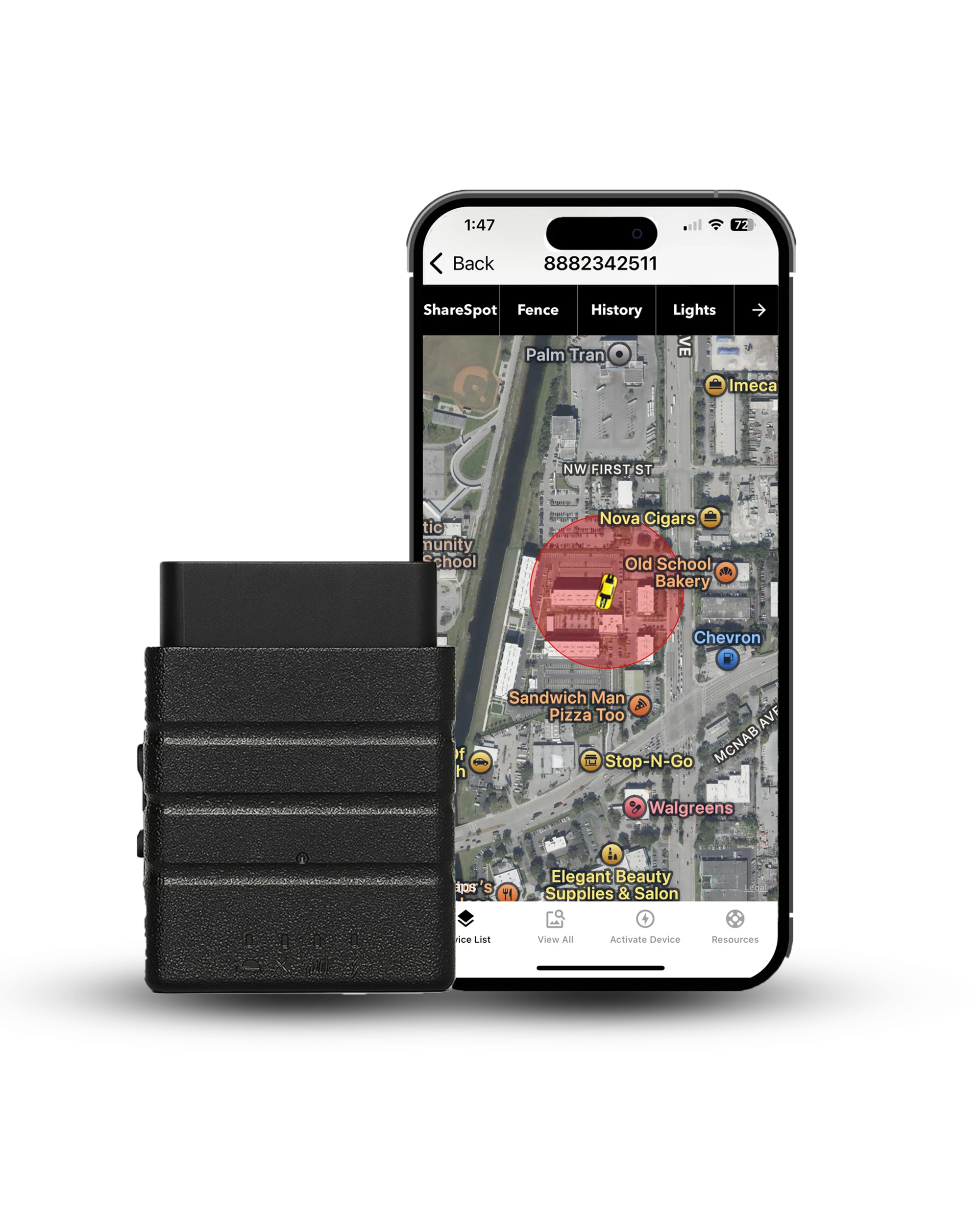
 Buy on Amazon