
What Data Does an OBD GPS Tracker Collect? (Full Guide)
-
01
OBD trackers collect location, engine data, driving events and alerts
-
02
Location updates run from 3 seconds to a full minute depending on the device
-
03
Engine diagnostics read fault codes and RPM straight from the ECU
-
04
Access is controlled by your account login and app permissions
-
05
Tracking someone else's vehicle without consent may break state law
As an Amazon Associate, Konnect GPS earns from qualifying purchases.
What Data Does an OBD GPS Tracker Collect
Most drivers have no idea what their car is reporting every second. Plug in an OBD GPS tracker and you're suddenly seeing live location, engine faults, driving events and trip history in real time. For fleet owners and everyday drivers alike, that visibility either saves money or exposes problems nobody knew about.
I'm Ryan Horban, and I've spent the last 15 years working with GPS vehicle trackers, fleet tracking devices, and commercial GPS tracking systems across real-world fleets.
The short answer: OBD GPS trackers collect real-time location, speed, driving events, engine diagnostics and trip history directly from the vehicle. This guide breaks down exactly what gets collected, how that data is used in practice, and where the privacy questions actually sit.

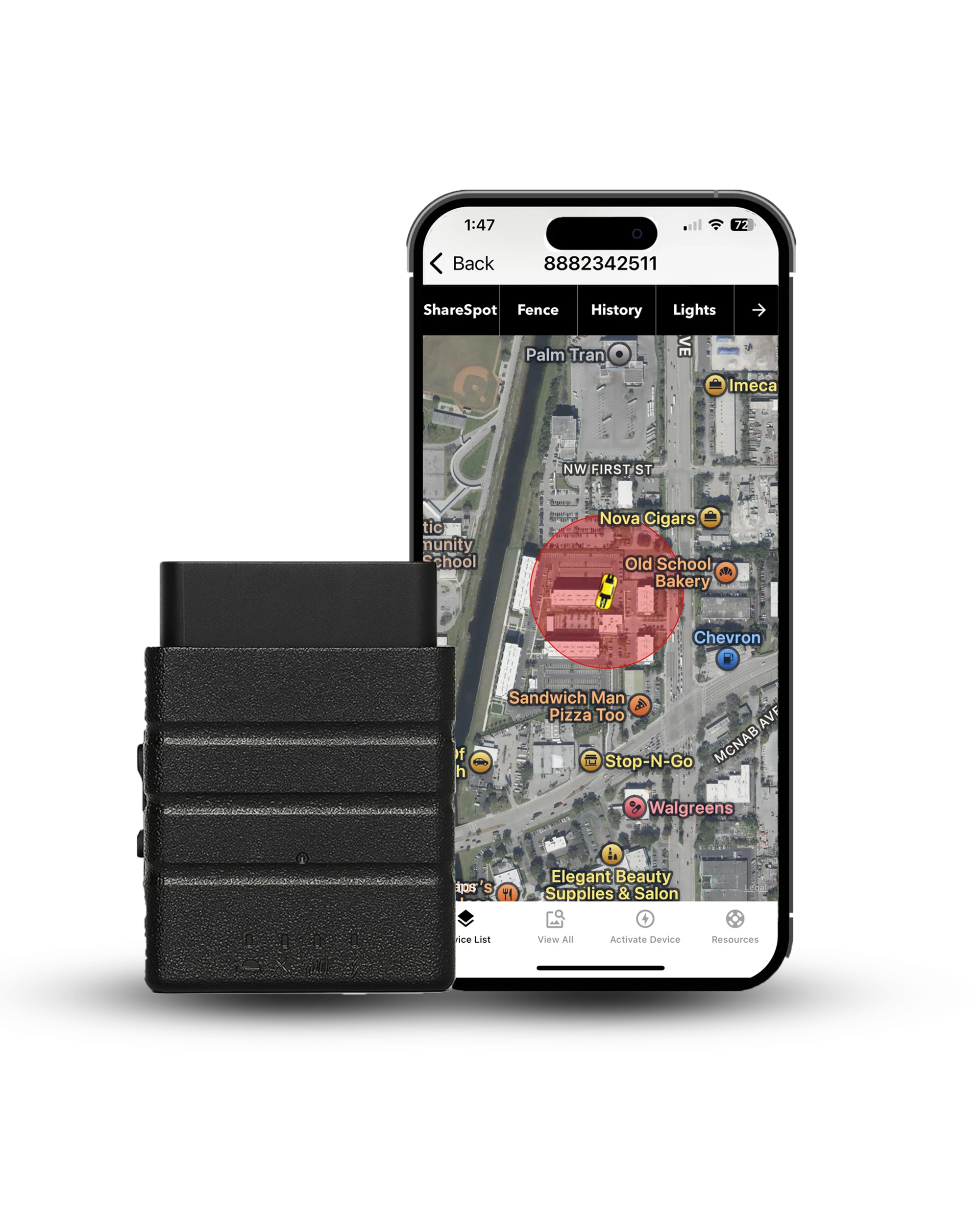
Konnect OBD2 GPS Tracker
Most trackers report once a minute. Konnect updates every 3 seconds, which is 20 times faster, and plugs into the OBD2 port with no tools and nothing to charge. $39 on sale from $99, plus $8.95 a month with no contract.
- 3-second updates, 20x faster
- Plug in, no tools
- Geofencing
- Speed alerts
- Tamper and unplug alerts
- 1 year trip history
- 150+ countries
- Lifetime warranty
A note on scope before we go further. Most of what follows describes what OBD GPS trackers can do as a category. Konnect provides real-time location, speed alerts, geofence alerts, tamper alerts and up to a year of trip history. It does not read engine diagnostic codes or score harsh braking and cornering, and that is deliberate: reading those means polling the vehicle's computer continuously all day, which is what opens the door to electrical issues across a fleet.
What an OBD Tracker Collects in Real Driving
These devices plug into the OBD port, pull data from the vehicle's onboard computer, and transmit it over a cellular network in real time. In practice the data falls into five categories.
| Data Category | What Gets Collected |
|---|---|
| Location data | Real-time coordinates, full routes, stop locations, trip distance |
| Vehicle data | Engine health, fault codes, fuel level, RPM |
| Driving events | Harsh braking, rapid acceleration, cornering, speed events |
| Alerts and events | Ignition on and off, geofence entry and exit, tamper notifications |
| System data | Power source status, cellular connectivity, SIM activity |
Each category gives a different layer of insight. Together they cover movement on the road, internal performance, and how the vehicle is actually being driven.
Real-time location and routes

Location data means latitude and longitude, route paths, stop locations and trip duration. Update intervals across the category run from 3 seconds to a full minute, and most trackers sit at the slow end.
Why the interval matters more than the feature list: at 60 seconds a vehicle on the highway covers most of a mile between updates, so the map shows where it was rather than where it is. Konnect polls every 3 seconds, 20 times more often, which is what makes a route replay actually match the road.
- Exact coordinatesUpdated continuously rather than at the end of a trip.
- Route history with timestampsThe full path, not just the endpoints.
- Stop durationHow long the vehicle sat at each location.
- Distance per tripThe number that becomes a mileage log or a fuel calculation.
Fleet teams use this to tighten routes and cut fuel spend, and stolen vehicle recovery depends on continuous location without gaps. For the mechanics of update speed and accuracy, see how real-time GPS tracking works.
Speed, acceleration and driving events

Driving-event tracking covers speed, rapid acceleration, harsh braking and sharp cornering. Devices that offer it analyze how a vehicle is driven, not only where it goes. Fleet managers use the data to coach safer habits, and insurers use similar data to price risk.
Worth understanding the trade: the braking and cornering half of this list requires continuous polling of the engine computer. Speed alerts do not, which is why almost every tracker offers speed while fewer offer a full behavior score.
Vehicle health and engine diagnostics

DTC: a diagnostic trouble code, the standardized fault code your car stores when something goes wrong. It is what a mechanic reads with a scan tool, and some trackers surface the same codes in an app so a developing problem shows up before the check engine light becomes a repair bill.
Diagnostic data comes straight from the onboard computer: trouble codes, engine RPM, fuel level, engine load. Trackers that read it can flag a minor fault early enough to schedule maintenance instead of a tow. This is the deepest layer of OBD data and the one that varies most between devices.
Trip history, idle time and route playback

Trip logs record start time, end time, route and duration, and over weeks they reveal patterns that are invisible day to day. Route playback also makes misuse of a company vehicle obvious without anyone having to accuse anybody.
- Complete trip logsEvery journey with timestamps at both ends.
- Route playbackWatch a past trip rather than reading coordinates.
- Idle timeEngine running, vehicle stationary. One of the largest hidden costs in a fleet.
- Distance per tripWhich is what a mileage claim or a fuel review is built on.
Alerts and event-based data

Event triggers include ignition on and off, entry or exit from a geofenced zone, and a tamper alert when the device is unplugged. These arrive as push notifications rather than sitting in a report.
A simple example: a company vehicle leaving a defined zone after working hours generates an alert immediately. Tamper alerts do the same when someone pulls the device, which is the signal that matters most in a theft.
Is OBD Tracker Data Private or Shared?
Tracker data is stored on cloud servers and reached through a mobile or web app. Whether it goes any further depends on the provider, the account setup and the permissions you grant. In normal use the data stays tied to your account unless sharing is switched on or the vehicle sits inside a fleet.
Who can access it

The account owner, plus anyone granted permission in the app. For personal use that is usually one person. In a fleet setup it extends to admins and managers, and access can be scoped so drivers do not see everything the manager sees. Some platforms allow integrations with outside systems, which depends entirely on how the account is configured.
How the data is stored and protected

Location data is sensitive, so this is worth asking a vendor directly rather than assuming. What a serious provider should be able to tell you plainly:
- How data movesWhether the link between tracker, server and app is encrypted in transit.
- How it is storedWhether it is encrypted at rest, and on whose infrastructure.
- How long it is keptRetention periods vary by provider and plan, and should be documented.
- Who can log inWhether two-factor authentication is available on the account.
A U.S.-based company with a published privacy policy and a phone number is easier to hold to those answers than an anonymous marketplace listing.
Legal rules on tracking a vehicle
Legality turns on ownership and consent. Tracking a vehicle you own is allowed. Tracking one you do not own, or a person without their agreement, is where it goes wrong. For the state-by-state picture see our guide to GPS tracking laws in the USA.
| Scenario | Where It Stands |
|---|---|
| Tracking your own personal vehicle | Legal in every state |
| Company vehicles with driver notice | Legal. New Jersey requires written notice for vehicles specifically, and several other states have notice rules whose application to GPS is unsettled |
| Tracking a vehicle you do not own | A crime in several states, and civil exposure on top |
| Business tracking with no written policy | Risky. A written, acknowledged policy is the defensible standard |
A manager can monitor a company vehicle used for work. Tracking a privately owned car without consent is a different thing entirely. Clear disclosure removes almost all of the risk, and it works better anyway.
Can these trackers be hacked?

The realistic risk sits with the account rather than the hardware. Weak passwords, reused credentials, outdated apps and loose integrations are what actually get exploited. Strong login credentials, two-factor where offered, current software and a short list of authorized users cover most of it.
How the Data Gets From Your Car to Your Phone

The tracker plugs into the OBD port, reads from the vehicle's computer, and sends data over a SIM-enabled cellular link to cloud servers. The chain is short:
Because power comes from the vehicle, there is no charging cycle and no gap where the device is off. That is what makes continuous monitoring possible in the first place.
What the port actually does
The OBD2 port is the direct connection between tracker and onboard computer. Standard on every U.S. vehicle since 1996, it lets a device read vehicle data without wiring and without modifying anything.
How telematics turns raw data into something readable

Raw coordinates and speed values are not useful on their own. The platform turns them into route maps with timestamps, trip summaries, maintenance prompts and the reports a manager actually opens on a Monday morning.
How This Data Cuts Costs and Catches Misuse

Instead of guessing, you can see where fuel is wasted, when maintenance is due and how the vehicle is being driven. Small patterns compound: long idle periods burn fuel, aggressive driving wears brakes and engines, missed service becomes a breakdown. With live data these show up early enough to correct.
-
Lower fuel costs
Better route planning and less wasted mileage, both visible in the trip history without any engine data at all.
-
Fewer repairs
Catching a fault while it is still a fault rather than a roadside failure.
-
Visible misuse
A company vehicle somewhere it should not be is obvious the moment you look at the route.
-
Tighter operations
Fewer disputes, fewer phone calls chasing drivers, and a record when someone questions a delivery.
Personal vehicle and family use
For families with a teen driver, the data answers the question directly: where is the car, how fast is it going, and did it go where it was supposed to. Alerts on entering or leaving specific areas cover the rest. This works best openly rather than covertly, and a teen who knows the tracker is there drives differently, which is the point.
Fleet management and business insight
Fleet data replaces manual reporting with route, mileage and usage figures collected automatically. Route optimization is the biggest single gain: when vehicles take inefficient paths or hit the same delays repeatedly, the pattern surfaces in the data. Underused vehicles and excess idle time surface the same way.
OBD vs Hardwired vs Battery Trackers
OBD trackers reach both movement data and vehicle data. Hardwired and battery units mostly provide location. The difference comes from how each one connects.
| Data Type | OBD Tracker | Hardwired | Battery |
|---|---|---|---|
| Location tracking | Yes, real time | Yes, real time | Yes, interval based |
| Driving events | Yes on many models | Limited | No |
| Engine diagnostics | Yes on some models | No | No |
| Power source | Drawn from the OBD port | Wired to the electrical system | Internal battery, limited life |
| Installation | Plug and play, seconds | Requires wiring | Portable, no install |
For fleet telematics and vehicle-health tracking, OBD gives the most for the least effort. Hardwired units suit long-term concealed installs, and battery trackers suit assets with no power at all. The full breakdown is in our portable vs OBD vs wired comparison.
Every tracker collects more than people expect. The question worth asking a vendor is not what it collects, it is who can see it and how long they keep it.
Conclusion
OBD GPS trackers collect far more than location. Routes, trip logs, driving events and, on some devices, engine diagnostics together give a full picture of how a vehicle moves and performs. That supports better decisions on fuel, maintenance and control.
Access stays governed by your account and the permissions you set, so privacy depends on how the system is configured rather than on the technology itself. Set up properly, you get visibility without exposing anything you did not intend to.
For personal use it answers safety questions. In a fleet it supports routing, cuts fuel spend and keeps vehicles on schedule. The value is in how the data gets used, not in how much of it gets collected.
Some images in this article were generated using AI.
Before you track anything
Everything on this page assumes the vehicle is yours, or that the driver knows. Placing a tracker on a vehicle you do not own, or monitoring another adult without their knowledge, is a crime in several states and can create civil liability on top of it. New Jersey requires written notice before tracking a vehicle an employee uses, and several other states have notice rules whose application to GPS is still unsettled.
Tell drivers the tracker is there. Disclosure removes almost all of the legal risk and the data is just as useful. This is general information rather than legal advice, so talk to an attorney about your own situation.
See What Your Vehicle Is Reporting
Plug Konnect into the OBD2 port and open the app. Real-time location every 3 seconds against the once-a-minute standard, plus speed alerts, geofence alerts and a year of trip history. Works on any 1996 or newer vehicle.
About the Author

 Buy on Amazon