
Key Features & Benefits of OBD GPS Tracker (2026 Guide)
-
01
Setup takes under one minute with no tools or installation required
-
02
OBD2 trackers read engine data and detect issues before warning lights
-
03
The device runs on vehicle power and does not require charging
-
04
Trip history logs routes, speeds, and timestamps for reporting needs
-
05
Employee tracking requires consent to avoid legal penalties
Disclosure: We sell the Konnect GPS tracker featured throughout this guide. Links to Amazon may earn us a commission at no additional cost to you.
An OBD GPS tracker is a small device that plugs into the diagnostic port under your dash and reports where a vehicle is, how fast it is moving and where it has been. The features worth paying for are live location, geofence and speed alerts, trip history you can go back through, and an alert if someone unplugs the device.
Ever wish your car could speak up before something goes wrong?
Maybe you've worried about where your teen is driving… or whether your fleet drivers are taking the long route again. Sound familiar?
That's exactly where OBD GPS trackers come in, and in 2026, they've become smarter, faster, and more affordable than ever.
These plug-and-play devices do way more than just tell you where your vehicle is. They give you real-time data, alert you when something's off, and help you cut down on unnecessary costs.
But with so many features out there, how do you know which ones actually matter?
That's what I'll break down for you in this guide. You'll learn which OBD GPS tracker features actually protect your vehicle, save you money, and keep you in control, no matter which of those three you are.
Let's get started.
What Makes OBD GPS Trackers Worth It?
An OBD GPS tracker is worth it when you want live location without an install bill or a battery to remember to charge. It runs off a port your car already has, starts reporting in under a minute, and keeps working as long as the vehicle has power.
Let's be honest, nobody has time for complicated installs, dead batteries, or "Where's my car?" panic. That's exactly why OBD GPS trackers have become a must-have in 2026.
Whether you're a parent keeping tabs on your teen, a small business owner managing vehicles, or someone who just wants real answers, these plug-and-play devices deliver real value.


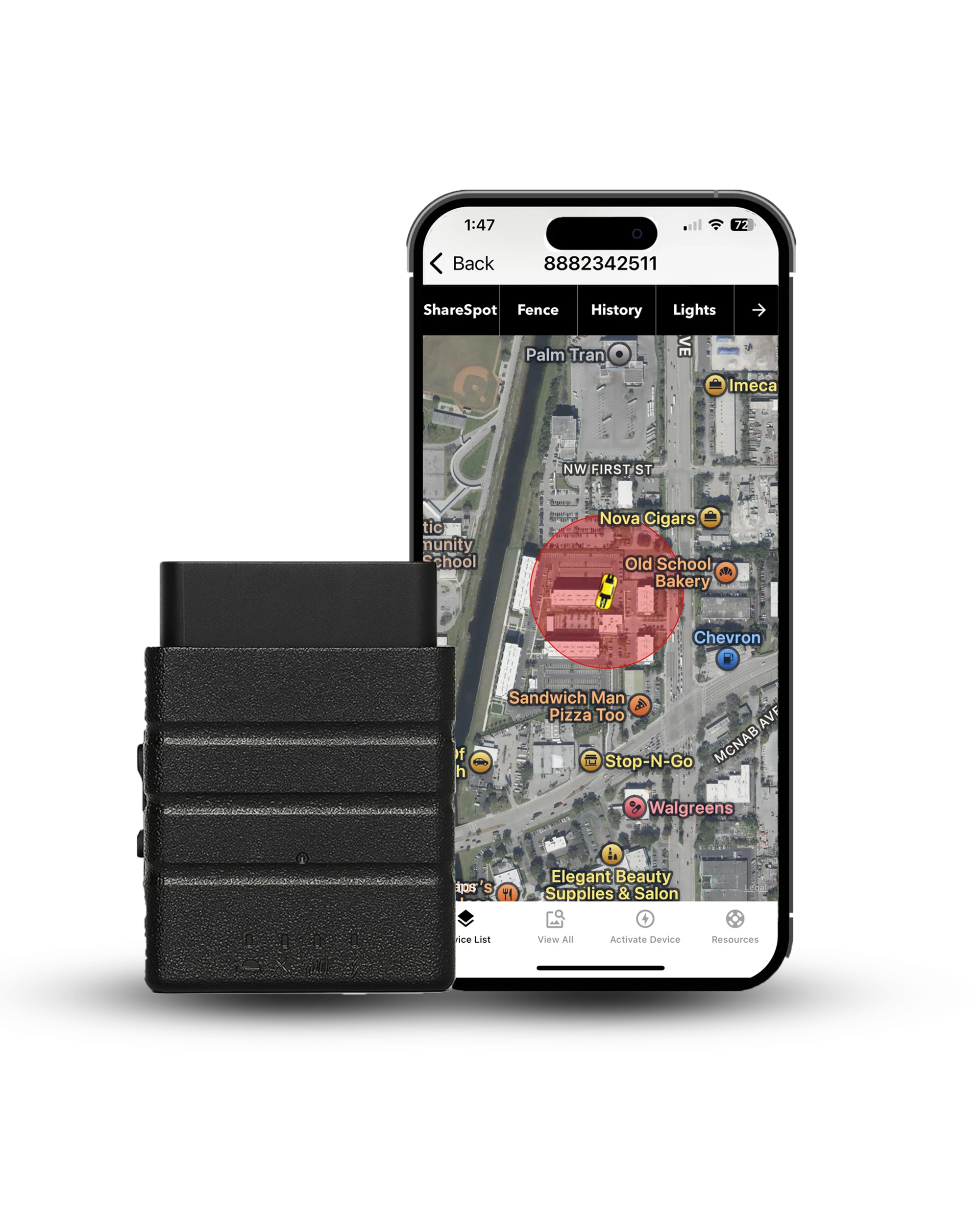
Konnect OBD2 GPS Tracker
Plugs into the OBD2 port in about 30 seconds and reports live location every 3 seconds. $39.95 on sale from $99.95, plus $8.95 a month with no contract.
- 3-second live updates
- Accuracy within 6 feet
- 1 year trip history
- Geofencing
- Speed alerts
- Tamper alerts
- 155+ countries
- Lifetime warranty
- 30-day money-back
Before you buy, what Konnect does not do: Konnect tracks location, not the engine. You do not get fault codes, battery voltage alerts, fuel data, or driving scores for harsh braking, cornering or idle time, all of which appear elsewhere in this guide as things the category can do. That is deliberate. Reading engine data means polling the vehicle's computer all day, which is what opens the door to electrical issues. If engine diagnostics are what you need, buy a tracker built for that instead.
Quick snapshot of why they're worth considering, before we dig into each one:
Up next: we'll explore these key features and benefits, showing you exactly how they help and who they help most.
Will It Work With Your Car?
Short answer? If your car was made after 1996, then yes, an OBD GPS tracker will most likely work just fine.
Why? Because all cars sold in the United States since 1996 are legally required to be OBD-II compliant. That means they come with the same standardized diagnostic port that these GPS trackers plug into. You'll usually find it under the dashboard, near the steering wheel. No tools needed.
OBD-II (On-Board Diagnostics, generation 2) is the standardized data port required in every U.S. vehicle built since 1996. Mechanics use it to pull engine trouble codes, and GPS trackers use that same port for both power and vehicle data.

What About Electric or Hybrid Vehicles?
Most electric vehicles (EVs) and hybrids also include an OBD-II port.
However, compatibility may vary slightly depending on the brand. Some EV manufacturers (like Tesla) limit third-party access to vehicle data, so always double-check before buying.
A quick search for "[your car model] OBD GPS tracker compatibility" can help.
Using an OBD Splitter (Pro Tip)
Worried about blocking access to your port for vehicle scans or inspections?
You can use an OBD splitter cable, it gives you two ports instead of one. That means your tracker can stay plugged in while you still have access for mechanics or emissions tests.
How to Set Up an OBD GPS Tracker in 3 Easy Steps
You set up an OBD GPS tracker in three steps and none of them need a tool. Find the port under your dash, push the device in, then pair it with the app.
Setting up your OBD tracker is easier than you think, with no tools and no hassle.

Locate your OBD-II port
Usually found under the steering wheel or dashboard. If you're unsure, check your vehicle's manual.
Plug in the tracker
Just insert it into the port, that's it. No wiring or installation required.
Open the app and pair
Download the tracker's app, create an account, and follow the on-screen pairing steps.
You're done! Most installations take less than 60 seconds from start to track.
Feature vs Benefit, a Quick Clarifier
A feature is what the tracker does. A benefit is what that changes for you. Geofencing is a feature, and getting a text when your teen leaves school early is the benefit you actually bought.
Not sure what counts as a feature versus a benefit when you're looking at OBD GPS trackers?
You're not alone, and honestly, it's an important distinction, especially if you're comparing options or trying to figure out what's actually useful versus what's just "nice to have."
The distinction breaks down simply.
A Feature is what the tracker does
Think of it like the built-in tools.
- Geofencing
- Live location updates
- Diagnostic code reading
- Instant phone alerts
A Benefit is why that matters to you
This is where the real value kicks in.
- Geofencing: You get a text when your teen driver leaves school early
- Live tracking: You know if your employee made it to a job on time
- DTC alerts: You catch engine issues early and avoid thousands of dollars for repairs
Curious how these trackers actually work behind the scenes? Check out our guide on How OBD GPS Trackers Work.
In this article, I'm not just listing tech specs. I'll walk you through both: the features your tracker should have, and the real-life benefits those features give you.
That way, you're not just buying a gadget, you're investing in peace of mind, safety, and savings.
Quick note before we dive in: not every OBD2 tracker on the market supports every feature below. Konnect specifically covers real-time location, speed alerts, geofencing, trip history, and tamper alerts, it does not include harsh-braking, idling detection or engine diagnostics, which some other trackers on the market offer.
Top Features You'll Love in an OBD GPS Tracker
The features that matter on an OBD GPS tracker do one of three jobs. They tell you where the vehicle is right now, they tell you the moment something changes, or they leave a record you can go back through later.
Below is what the best OBD GPS trackers actually give you, and why it matters in real life.

01Real-Time Location Updates
Live location is the feature everyone buys the tracker for, and it is the one where the published numbers actually differ. A device that refreshes every few seconds shows you a car moving down a street. One that refreshes every few minutes shows you a line of dots and leaves you guessing about everything in between, which is exactly the gap a thief or a curious teenager drives through. Konnect refreshes every 3 seconds while the vehicle is moving.
When you compare trackers, look for how often the map updates rather than how often the device takes a reading, because plenty of brands publish the faster of the two.
02Geofence Alerts
A geofence is a boundary you draw on a map.
Put one around the school, the office, or the yard where the trucks sit overnight, and the tracker tells you the moment a vehicle crosses that line in either direction. This is the feature parents lean on hardest, because it answers the question you were going to ask anyway without you having to open the app and go looking. For a business it does the same job in reverse, confirming a van reached a site without anyone phoning to check.
Worth checking how many zones a tracker allows and whether you can set separate alerts for arriving and leaving.
03Driving Behavior Monitoring
Some OBD trackers score how a vehicle gets driven, logging harsh braking, sharp cornering, rapid acceleration and time spent idling, then turning all of it into a report card per driver.
That data earns its keep if you are running a safety program or coaching a new driver, and a few insurers will discount a policy for it. It also carries a trade-off that rarely makes the marketing copy. Reading it means the device polls your engine computer all day, every day, which is a far heavier electrical load than tracking position alone, and across a fleet that is where battery complaints start. Konnect leaves behavior scoring out for that reason and covers speeding only.
04Diagnostic Trouble Code (DTC) Alerts
When your car's computer spots a fault it generates a code, and that code is what a mechanic reads when your check-engine light comes on. A tracker with diagnostics access reads the same code and pushes it to your phone, sometimes before the light reaches your dash at all.
- You walk into the shop knowing the actual fault code
- You catch a small problem while it is still small
- Across a fleet you spot a fault repeating on three vans rather than one
Konnect does not read diagnostics. If this is the feature you came for, buy a tracker built around the engine rather than the map.
A DTC (Diagnostic Trouble Code) is the alphanumeric code your car's computer generates the moment it detects a problem, the same code a mechanic pulls when your check-engine light comes on.
05Trip History and Route Replay
Every trip gets stored with its route, its stops and its timestamps.
That record is what settles arguments. A customer says nobody showed up, a driver says they sat there for an hour, and the replay tells you which one is right in about ten seconds. The number worth comparing here is how long a platform keeps the history, because it varies more than anything else on the spec sheet. Konnect holds a full year, a couple of competitors keep everything indefinitely, and the cheap no-name devices quietly drop anything older than a month.
06App and Dashboard Integration
The app is the part you actually touch every day, so it matters far more than the hardware spec suggests. You want the map, the alerts, the trip history and the settings in one place, behaving the same on a phone as on a laptop.
Before you buy, go find a screenshot or a demo video. A tracker with good hardware and a bad app is a tracker you stop opening after three weeks.
07Tamper Alerts and Stealth Mode
An OBD tracker sits in a port under the dash, which means anyone who knows it is there can pull it out in two seconds. Tamper detection is what makes the device worth something anyway, because it tells you the moment power is cut instead of simply going silent and leaving you to notice hours later. The question worth asking is what happens in the minutes after that. Some trackers fire the alert and stop there. Konnect sends the alert and keeps reporting its position for about 15 minutes on an internal battery, which is usually enough to see which direction it went.
If theft is your main reason for buying, compare this row before you compare price.
08Sleep Mode and Power Management
A tracker draws power from your car whether you are driving it or not.
Sleep mode is how a device keeps that draw low while the vehicle sits, usually by reporting far less often once it works out the engine has been off for a while. On a car you drive every day this barely registers. On a work truck that sits for three weeks between jobs, or a second car that only comes out at weekends, it decides whether you come back to a flat battery.
Ask what the parked draw actually is before you leave a tracker in a vehicle you rarely start.
09Cloud Storage and Report Exports
Everything the tracker records lives in an account rather than on the device itself, which is what lets the data outlive the hardware.
The part people underestimate is the export. Pulling a route up on screen is easy, and handing an accountant or an insurance adjuster a file they can open is a different job entirely. If you need trip logs for tax deductions, mileage reimbursements or a fleet audit, ask what formats the platform exports and whether that takes one click or a support ticket. It is a dull question that saves a genuinely annoying afternoon later.
In fifteen-plus years of testing these devices, I've noticed the moment they earn their keep is rarely dramatic. Take a fleet manager who spots a truck idling forty extra minutes a week and fixes it before the fuel bill does the noticing. Or a parent who gets a late-night alert, calls their kid, and the conversation happens before anything worse does. The value isn't the gadget, it's catching the small thing early enough that it never becomes a big one.
The Real Benefits of OBD GPS Trackers
The real benefit of an OBD GPS tracker is that it turns questions into answers. Where is the van, did the delivery happen, did my kid get home, is the car still in the lot. Each one stops being a phone call and becomes a glance at your screen.
Now that you know what these devices can do, let's talk about what that means for your wallet, your safety, and how much you can stop worrying.

01Save Money on Fuel, Repairs and Insurance
The savings arrive from three directions and none of them are dramatic on their own. Less fuel burned on detours and long idles, fewer repairs that got expensive because nobody noticed the early sign, and in some cases a lower premium when an insurer rewards a monitored vehicle.
Add those up across a year and a handful of vehicles, and the subscription stops being the expensive line item.
02Peace of Mind for Parents and Families
This is the reason most people actually buy one.
You know when your teen left school, whether they got home, and whether the car is where they said it would be, without having to ask and without turning it into a conversation every single night. The same works in the other direction with a parent who still drives alone, where the point is not watching them but simply not wondering. That sounds like a small thing right up until the evening you need it.
03Better Theft Recovery Odds
A stolen car with a live tracker in it makes for a very different police report. Instead of describing the vehicle and waiting for someone to spot it, you hand over a location that keeps updating while you are still on the phone, and recovery odds climb sharply when officers are following something current rather than something from an hour ago. Pair that with a tamper alert and you also know roughly when the car left, which narrows the search before anyone starts driving around.
Keep in mind that a thief who knows about OBD trackers will check under the dash, so the backup battery window is what buys you the minutes that count.
04Improved Fleet Efficiency
One dashboard with every vehicle on it changes how a small operation runs day to day. You stop calling drivers to ask where they are, you stop guessing which van sits closest to the next job, and you find out which vehicle is quietly doing three times the mileage of the rest.
None of that needs a logistics department behind it. On a fleet of five to fifteen, most of the gain comes from simply being able to see all of them on one screen at the same time.
A 2014 FMCSA field study on Class 8 trucks found that pairing telematics with driver feedback, coaching, and incentives improved fuel economy by 5% for sleeper cab drivers and 9% for day cab drivers. The device alone isn't what moves the needle, the coaching built around the data is.
05Safer Teen Drivers
Speed alerts and geofences do most of the work here.
The part that genuinely changes behavior is the trip replay, because it lets you talk about one specific drive instead of having a general argument about driving. A route on a screen is much harder to disagree with than a feeling that someone has been heavy on the pedal lately. If you are shopping specifically for a new driver, our roundup of the best GPS teen driving monitors compares seven devices on exactly these features.
Tell them it is there. A tracker your teen finds by accident costs you more than it ever gains.
06Accurate Trip Logs for Business or Tax Use
If you claim mileage, the log is the deduction. Reconstructing six months of trips from memory in April produces a number you cannot defend, and most people undercount rather than overcount, because the short trips are the ones that slip. An automatic log records every drive with its date, its distance and its route, which is exactly what an auditor asks to see. We go deeper on that in our guide to using an OBD GPS mileage tracker.
The same record doubles as proof of a service call when a customer insists nobody came.
07Increased Accountability for Drivers or Employees
People drive differently when they know the vehicle reports. That is not a criticism of anybody, it is just how attention works, and it is why the effect shows up in the first week rather than after a month of coaching.
The word that matters legally is transparently. Tell your drivers in writing before the device goes in, put it in the handbook, and the whole thing stays a management tool instead of a lawsuit. Done that way it also protects the drivers, because the same record that shows a late arrival also shows the traffic that caused it.
Feature-to-Benefit Comparison Table
Each feature below earns its place by solving one problem. Read the middle column first, because that is the part you will actually feel.
Here's a quick-reference table connecting each feature to its real-world benefit.
Swipe the table sideways to compare
| Feature | Why It Helps THE PART YOU FEEL | Best For |
|---|---|---|
| Real-Time Location | Know exactly where the vehicle is, right now | Parents, fleet managers |
| Geofence Alerts | Get notified of unexpected zone entry or exit | Teen drivers, delivery routes |
| DTC Alerts | Catch engine problems before they get expensive | Everyday drivers, fleet owners |
| Trip History | Review past routes and driving patterns | Businesses, insurance claims |
| Tamper Alerts | Detect unauthorized removal or interference | Theft protection, teen monitoring |
| Sleep Mode | Preserve battery life, stay hidden if needed | Long-term or stealth tracking |
| Cloud Reports | Access driving and trip data anytime, anywhere | Fleet audits, tax documentation |
Who Gains the Most From These Features?
Parents, small business owners, caregivers, gig drivers and anyone worried about theft get the most out of these features. What changes between them is which two or three they actually use every week.
Not everyone needs every feature, but almost everyone benefits from a few key ones. A quick breakdown by user type.
- Parents: Real-time alerts, safe zones, and speed tracking help you stay connected without hovering.
- Small business owners: Manage a small fleet without hiring a logistics team, GPS tracking gives you visibility and control.
- Caregivers: Get notified if an elderly parent leaves a familiar area or takes an unusual route.
- Rideshare or delivery drivers: Prove routes taken, track time spent per job, and monitor fuel usage for reimbursement.
- Anti-theft buyers: Real-time GPS plus tamper alerts means faster recovery and less risk of losing a vehicle entirely.
Legal, Ethical & Practical Considerations
The rule of thumb is ownership and disclosure. Track a vehicle you own and you are almost always fine, and the moment another adult drives it for work, tell them in writing before the device goes in.
GPS tracking is a powerful tool, but it comes with responsibility. Before using one, it's important to understand the legal and ethical lines.
Tracking someone else's vehicle without consent, especially in an employment or personal relationship context, can violate privacy laws. Some states, California under AB-984 among them, require written notice or consent before you track employees, and violating that can cost up to $1,000 per employee, per day.
If you are putting trackers in work vehicles, disclose it in writing before the devices go in, put it in the handbook, and read up on GPS tracking laws in your state first. This is general information rather than legal advice, so check with an attorney if anything about your situation is unusual.
Personal use, like tracking your own car, teen driver, or elderly parent's vehicle (with their knowledge) is typically fine. When in doubt, consult your state laws or a legal advisor.
Are These Features Actually Worth It?
Yes, as long as you buy for the two or three features you will actually use. A tracker that nails live location, alerts and trip history solves most of what people buy one for, and paying extra for diagnostics you never open is where the money gets wasted.
Short answer: yes, if you choose the right tracker for your needs.
The best OBD GPS trackers combine simplicity with serious functionality, with real-time updates, geofencing, and tamper alerts all wrapped into a plug-and-play device that takes less than a minute to install.
Parent, business owner, or just someone who wants to know their car is safe, these features aren't just nice extras. They solve real problems and give you real control.
Ready to Get the Tracking Side in One Device?
Konnect plugs into your OBD2 port in about 30 seconds and reports live location every 3 seconds. $39.95 on sale from $99.95, plus $8.95 a month with no contract.
What Konnect does not do: no engine trouble codes, no battery voltage alerts, no fuel data, and no driving scores for harsh braking, cornering or idle time. Konnect covers live location, speed alerts, geofencing, a full year of trip history and tamper alerts.
About the Author

 Buy on Amazon