
How to Use GPS Speed Report for Accident Prevention & Safely
-
01Speed reports turn scattered driving events into a pattern you can actually act on
-
02A threshold set to real road conditions produces alerts worth reading, not noise
-
03Coaching works when it is private, specific and paired with context from the route
-
04An OBD2 tracker installs in a minute and is the practical entry point for most small fleets
-
05Progress shows up over months in trend lines, not in any single week of data
How to Use GPS Speed Reports to Improve Driving Habits
Most people who buy a GPS tracker for speed monitoring end up staring at a wall of alerts and no idea what to do next. The data is not the hard part. Turning it into behavior that actually changes is.
Speeding is one of the easiest driving behaviors to measure and one of the hardest to change through conversation alone. Telling someone to slow down rarely works. Showing them a pattern, backed by specific dates, roads and times, usually does. That is the difference a GPS speed report makes, and it is why fleet managers and parents reach for the same tool for very different reasons.
This guide walks through how speed reports work, how to set thresholds that produce signal rather than noise, and how to run a coaching conversation that lands. Nothing here needs a fleet-sized budget or a dedicated safety manager.

Who This Is For, And Why Speed Reports Work
Three groups get the most out of speed data, and each one is solving a slightly different problem.
-
Small fleet operators
Running five to fifty vehicles, where one at-fault crash moves the insurance premium for years and there is no safety department to lean on.
-
Parents of new drivers
Teenagers in the first two years behind the wheel, where habits form fast and a pattern is more persuasive than a lecture.
-
Owner-operators
Drivers tracking their own habits, often to keep insurance costs down or to hold themselves to a standard nobody else is watching.
The reason speed data works across all three cases is that speeding is not usually a one-off decision. It is a habit shaped by routine, route and schedule pressure. A report exposes that shape, and a shape is something you can change.
Share of all US traffic fatalities in 2024 where speeding was a contributing factor, accounting for 11,288 deaths. Speeding-related deaths fell 5.2% that year, a third consecutive annual improvement.
Source: NHTSA, Speeding: 2024 Data

Why GPS Speed Reports Reduce Accident Risk
Speed reports work because they replace opinion with evidence. Four things follow from that.
-
Patterns surface before incidents do
One speeding event tells you almost nothing. Twenty events clustered on the same stretch of road at the same hour tells you where a crash is most likely to happen, months before it does.
-
Conversations stop being arguments
A date, a road and a recorded speed removes the disagreement about whether it happened. What remains is a discussion about why, which is the useful half.
-
Awareness alone changes behavior
Drivers who know their speed is recorded tend to moderate it without any coaching at all. That effect is strongest in the first weeks and needs reinforcement to hold.
-
Insurance and liability exposure drops
A documented monitoring and coaching program is evidence of diligence if a claim ever lands. Some insurers price that in directly, and all of them notice it after an incident.
What A Speed Report Shows, And What It Does Not
Knowing the limits of the data is what separates useful coaching from unfair coaching.
What the data captures
- Maximum speed reached during each trip, with the time it occurred
- Duration above your threshold, which matters far more than a single peak
- Location of each event, so you can see whether it clusters on one route
- Frequency over time, which is the number that tells you if anything is improving
- Trip context including start and end points, route taken and total distance

OBD2 against hardwired and battery units
The device you choose changes what the report can tell you, and how much work it takes to keep running.
Push into the diagnostic port under the dash, usually in under a minute with no tools. Power comes from the vehicle, so nothing needs charging and reporting can run fast without any runtime cost.
Best for small fleets and family vehicles built from 1996 onwardHardwired units are concealed and tamper resistant but need professional installation. Battery units go anywhere, including trailers and equipment with no power at all, at the cost of recharging them.
Best for concealed installs and unpowered assetsWhat speed reports do not tell you on their own
This is the part most guides skip, and it is where unfair coaching conversations start.
- Why the driver was speeding. Merging into fast traffic, a medical emergency and simple impatience all look identical in a report.
- Road conditions at the time. Rain, ice and construction all change what a safe speed actually was, and none of it appears in the data.
- Whether the posted limit was current. Temporary limits in work zones frequently differ from the mapped limit a tracker compares against.
- Traffic flow around the vehicle. Driving 5 mph over on an empty road at 6am is a different risk from the same 5 mph in dense traffic.
None of that makes the data less useful. It means the report starts the conversation rather than finishing it. Ask before you conclude.

How To Use Speed Reports, Step By Step
Six steps, in order. Skipping the first one is the most common reason the rest fails.
-
1
Set thresholds that match real roads
A threshold set too tight buries you in alerts you stop reading. Set too loose and genuine risk slips past. The workable middle is a margin over the posted limit rather than the limit itself.
- Start around 5 to 10 mph over the posted limit and adjust after two weeks of real data
- Set different thresholds for highway and surface streets, because the risk profile differs
- Alert on sustained speeding rather than a momentary peak, which is usually a merge or an overtake
- Review the threshold quarterly as routes and vehicles change

-
2
Review patterns, not individual events
One event is noise. The signal lives in repetition, and repetition only shows up when you look at a week or a month at once rather than reacting to each alert as it arrives.
- Look for the same road appearing repeatedly, which usually points to a route problem rather than a driver problem
- Check the time of day, since a cluster at the end of a shift often means the schedule is too tight
- Compare drivers on similar routes before concluding anything about one of them
- Watch whether frequency is rising or falling, which is the only measure of whether coaching is working

-
3
Run the coaching conversation properly
The data gets you into the room. How you use it decides whether anything changes afterward. Coaching that feels like surveillance produces resentment and workarounds rather than safer driving.
- Hold it privately, never in front of other drivers
- Open with a question about the route rather than an accusation about the speed
- Bring specific dates and locations, because vague concerns invite vague denials
- Agree one concrete change and a date to look at it again

-
4
Track improvement over months
Week-to-week numbers bounce around for reasons that have nothing to do with driving: weather, route changes, a different vehicle. Trends over months are what actually tell you whether the program is working.
- Compare month against month rather than week against week
- Normalize for miles driven, since more driving produces more events without meaning worse driving
- Track the share of trips with any event, which is a fairer measure than raw event counts
- Share the trend with drivers, because progress that nobody sees stops being motivating

Choosing The Right Tracker For Speed Data
Not every tracker produces reporting worth acting on. Five questions decide it before you spend anything.
- How often does it report position? A unit reporting once a minute can miss a short burst entirely. Faster reporting produces a speed record you can defend in a coaching conversation.
- Can you set your own speed threshold? A fixed threshold you cannot adjust is close to useless, because the right number differs between a highway route and a delivery round.
- How long is history retained? Thirty days is not enough to see a trend. A year of history is what lets you show a driver their own improvement.
- How quickly does it install? An OBD2 unit takes under a minute per vehicle. A hardwired install takes an appointment, which matters when you are fitting fifteen vans.
- What does the first year actually cost? The subscription usually costs more over twelve months than the hardware did. Compare the total, per vehicle, before committing to a fleet-wide rollout.

Operational Best Practices
The technology is the easy half. These are the practices that decide whether a monitoring program survives its first six months.
- Tell drivers first Announce the tracking before it goes in, in writing, and explain what is measured and why. Drivers who discover a device themselves assume the worst, and in several states written notice on company vehicles is the legal standard anyway.
- Write the policy down Put the threshold, the review cadence and the consequences on paper. An unwritten standard gets applied inconsistently, and inconsistency is what drivers actually object to.
- Coach before you discipline The first conversation is about understanding the route and the schedule. Discipline belongs to repeated behavior after a documented conversation, not to the first alert that arrives.
- Fix the schedule too If speeding clusters at the end of a shift, the route is too long or the stops are too tightly spaced. No amount of coaching solves a scheduling problem, and pretending otherwise costs you drivers.
- Recognize improvement Programs that only ever deliver bad news get ignored. Telling a driver their event rate halved is what keeps the whole thing from feeling like surveillance.

Common Mistakes That Reduce Effectiveness
Five failures account for most programs that quietly stop being used.
- Setting the threshold at the posted limit Every merge, every overtake and every downhill stretch throws an alert. Within a fortnight nobody is reading them, and the genuine events are lost in the pile.
- Reacting to single events Confronting a driver over one alert costs credibility, because there is almost always a reasonable explanation. Wait for a pattern that a conversation can actually address.
- Coaching in public Raising a driver's numbers in front of colleagues turns a safety conversation into a humiliation, and the response is concealment rather than improvement.
- Installing the tracker in secret The discovery does more damage than the speeding ever did, and it can breach notice requirements that apply to company vehicles in several states.
- Collecting data nobody reviews A tracker running with no monthly review is an expense, not a safety program. Fifteen minutes a month is enough, but it has to be somebody's job.

The features that matter for speed monitoring are an adjustable threshold, a fast reporting rate, and at least a year of stored history. Without all three you are looking at alerts instead of a trend.
Who Should Use Speed Reports, And Who Should Not
Being honest about the second column saves people money and disappointment.
- Fleets of five vehicles or more, where patterns are visible and premiums are material
- Parents of drivers in their first two years, when habits are still forming
- Businesses whose insurers reward a documented monitoring program
- Operations where routes repeat, so route-level problems can be separated from driver-level ones
- Anyone willing to spend fifteen minutes a month reviewing the trend
- A single vehicle you drive yourself, where the report tells you what you already knew
- Anyone who will not review the data, since collection without review changes nothing
- Workplaces where the tracking would be introduced without telling drivers
- Situations where the real problem is the schedule and the tracker is standing in for fixing it
- Monitoring an adult who has not agreed to it, which is a legal problem rather than a fit problem

The Short Version
Everything above condenses to six lines.
- Set the threshold 5 to 10 mph over the posted limit, different for highway and surface streets, adjusted after two weeks of real data
- Review the pattern Weekly or monthly, looking for repeated roads and times rather than reacting to each alert
- Coach privately Specific dates and locations, opening with a question about the route, closing on one agreed change
- Measure over months Normalized for miles driven, tracking the share of trips with any event rather than raw counts
- Tell drivers first In writing, before installation, which is both better practice and the legal standard in several states
- Pick the hardware Adjustable threshold, fast reporting, a year of history, and an install you can complete across the whole fleet
Speed data does not make anyone a better driver on its own. What it does is replace an argument about whether something happened with a conversation about why, and that conversation is where the improvement actually comes from.
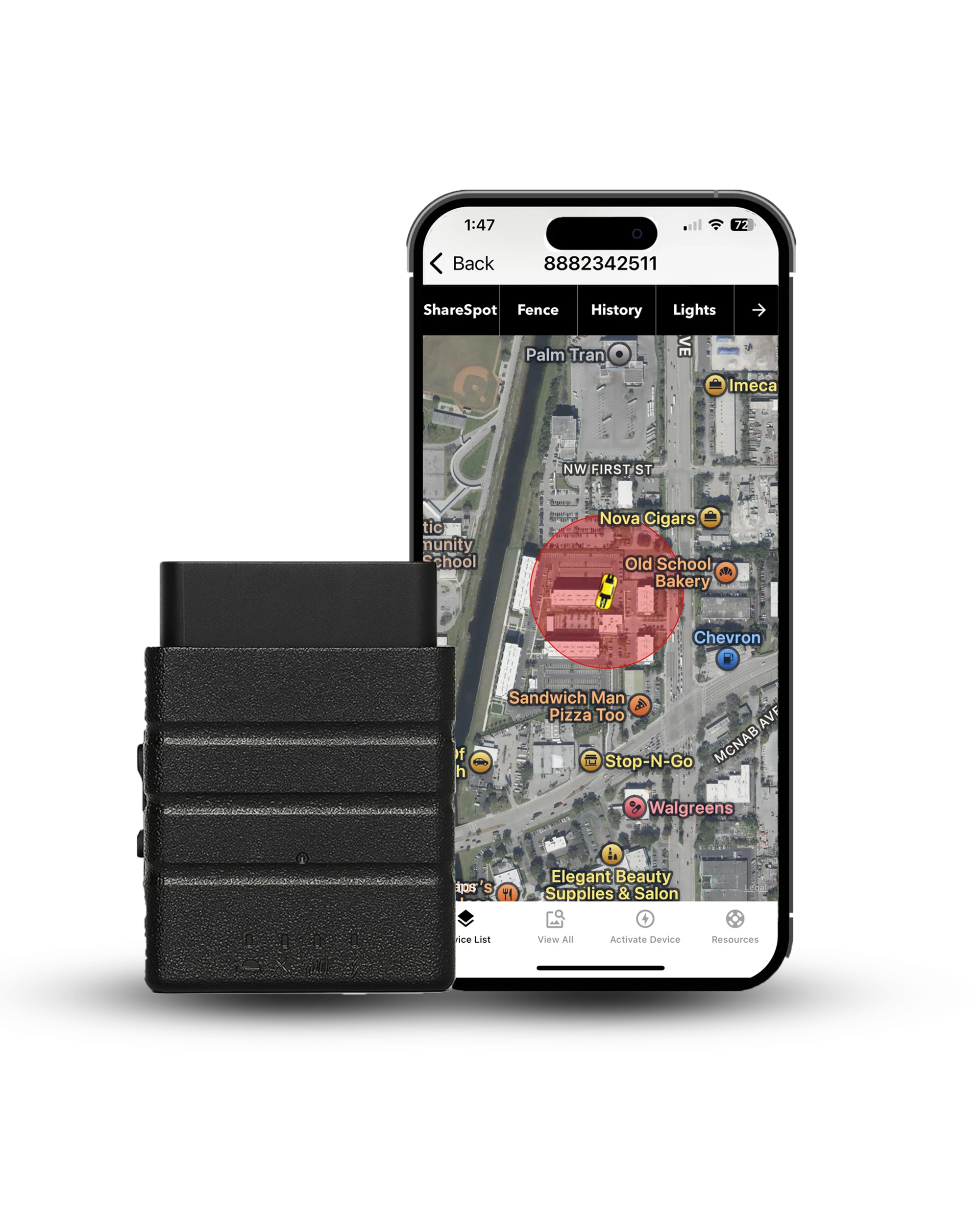
The Konnect OBD2 GPS Tracker supports real-time location, speed alerts, geofence alerts, tamper alerts and up to a year of trip history. Behavior metrics such as harsh braking or idling detection are available on some other tracking platforms and are not included with Konnect.
Tracking a vehicle your business owns or leases is legal in all fifty states, but several require advance written notice to the employees who drive it, including New York, Connecticut, Delaware, New Jersey and Rhode Island. Take-home and mixed-use vehicles are where written consent becomes the defensible standard everywhere. Placing a tracker on a vehicle you do not own, to monitor a person who has not agreed to it, is a separate matter and a crime in most states. This is general information rather than legal advice, so check your own state's rules before rolling a program out.

The Konnect OBD2 tracker pushes into the port under the dash and reports every 3 seconds on vehicle power, with adjustable speed alerts, geofence alerts and up to a year of trip history. $39.95 for the device, $8.95 a month with no contract, and a lifetime manufacturer's warranty.
About the Author

 Buy on Amazon