
Is There An App To Find My Car?
-
01Google Maps and Apple Maps already save your parking spot, with no extra app and no cost
-
02Bluetooth apps log the spot automatically when the car shuts off, but only if the phone stays paired
-
03Every GPS-based app loses accuracy in underground garages, because the signal cannot pass through concrete
-
04Background location tracking drains phone battery, which matters most on the days you are out longest
-
05An OBD2 GPS tracker logs the location on its own, with nothing for you to remember to tap
Konnect GPS received no payment from any of the app developers listed here, and holds no affiliation with them. Konnect does sell the OBD2 GPS tracker discussed near the end of this guide, so treat that section as the one place we have a commercial interest.
Top 7 Apps to Find Your Parked Car
Have you ever wandered around a crowded parking lot, desperately trying to recall where you left your car? We have all been there, and honestly, few things sour a good afternoon faster. Fortunately there are apps for everything, including finding your own vehicle. Google Maps and Apple Maps both handle this now, and third-party apps go further with more specialized tools.
Below are seven options for anyone who has ever asked, "Is there an app to find my car?" Each entry covers what the app actually does, what it runs on, and where readers have run into trouble with it. Let's dive in.

The problem every app on this list is trying to solve.
| App | Platform | How it saves your spot | Watch out for |
|---|---|---|---|
| Find My Car | iPhone and Android | You tap to drop a GPS pin, then follow walking directions back | Reviewers complain about aggressive ads styled to look like app buttons |
| Anchor Pointer | iPhone only | You drop an anchor and a compass arrow points you back, offline included | The developer states the parked-car feature only works in open-air lots |
| AR Car Locator | Android | A 3D arrow overlays your camera view and points toward the car | Runs in the background and pings you every 30 minutes |
| Parkify | Android | Detects the parking event automatically when car Bluetooth disconnects | Several unrelated apps share the name, so check the developer |
| Parked Car Locator | Android | Launch it before you walk away and it logs the spot | One car at a time, and no automatic saving |
| Parking Pin | iPhone only | Saves the spot quietly in the background using motion sensors | Older iPhones may need you to drop the pin by hand |
| Honk | iPhone only | Marks the spot as you close the app, and adds a meter alarm | A busy interface, and two unrelated companies use the Honk name |
Start With What Is Already on Your Phone
Before downloading anything, check the maps app you already use. Google Maps saves a parking location in a few taps: open the app, tap the blue dot showing your current position, and choose "Save your parking." From that same screen you can add a note, take a photo, or set a meter reminder. Apple Maps does something similar on iPhone, and it can save the spot automatically when your car disconnects from CarPlay or Bluetooth.
These tools save a spot, they do not track a vehicle. A saved pin tells you where the car was when you tapped the button. If the car moves after that, whether a friend borrowed it, a tow truck took it, or somebody stole it, the pin still points at the old space.
1. Find My Car
One of the better known options, Find My Car records your position by GPS each time you park, so a single tap navigates you back. The app also gives walking directions from wherever you are standing to the car, which earns its keep when you are shopping or exploring an unfamiliar city.
- Records the car's location using GPS
- Provides walking directions back to the car
- Widely downloaded, with a large user base on the Google Play Store
Reviewers are broadly positive about whether the app works, and consistently unhappy about the advertising. A recurring App Store complaint describes ads carrying a "START" button designed to look like part of the app itself, with users asking for a paid option to remove them.
Read PCMag on using a phone to find your car

Find My Car ratings and reviews as shown on the App Store.
2. Anchor Pointer
Anchor Pointer takes the simplest possible approach. You drop an anchor where you park, and when you come back the app shows a compass arrow and a distance, rather than a map you have to interpret. Because the position is held by GPS on the phone itself, the arrow keeps working without an internet connection, which is why hikers and boaters use it as much as drivers.
- Compass arrow and live distance instead of a map view
- Drop an anchor at the car, a trailhead, or any spot worth remembering
- Works offline, with no data connection needed to navigate back
Users describe it as simple and accurate, with the compass proving useful well beyond parking lots. The most common request is a better Apple Watch version showing the same arrow and distance the iPhone gives. One caveat comes from the developer rather than reviewers: the parked-car feature is documented as working only in open-air lots, because of the same GPS limitation covered above.

Anchor Pointer uses a compass arrow rather than a map.
3. AR Car Locator
With AR Car Locator, getting back to the car means following an arrow drawn over your camera view. Leave the app running in the background, and when you park you can activate the augmented reality view by holding your phone up ahead of you. Prefer a map? Switch to the Google Maps overlay to see the car pinned instead. You can also snap a photo of the spot and mark it with the parking button, then check parking time from the notification bar.
The app pings you every 30 minutes so the meter does not catch you out. Those frequent reminders are a lot for some people, and running in the background costs battery, so this one asks more of your phone than the simpler options do.
- Augmented reality view locates the car visually
- 3D arrow points toward the car's saved position
- Photo capture and parking timer with recurring reminders
View AR Car Locator on Google Play
4. Parkify
If you forget where you parked often enough to want the phone handling it for you, Parkify is built for exactly that. The app pairs with your car's Bluetooth, and once paired it logs the GPS coordinates every time the ignition goes off, with no tap required. What sets it apart from most of this list is multi-vehicle support, so you can add several cars and switch between them.
- Detects parking events automatically through the car's Bluetooth
- Saves GPS coordinates of the spot without any manual input
- Handles more than one vehicle from a single app
Reviewers make one practical point worth repeating: the automatic detection is far more reliable when the app is already running, so a quick glance at your phone before you lock up improves the hit rate. Note also that several unrelated apps use the Parkify name, including a parking rewards app and a subscription management tool, so check the developer before installing.

The Parkify listing on Google Play.
5. Parked Car Locator
For Android users, Parked Car Locator is a popular and deliberately plain option. The app uses GPS to pin the spot and then guides you back to it. Nothing needs pairing with your car's Bluetooth. Launch the app before you walk away, and the location is logged and saved for later.
- Simple, uncluttered interface with almost nothing to configure
- Uses GPS for the location fix
- No Bluetooth pairing required
That simplicity is also the complaint. Reviewers who share vehicles report the two limitations that matter most here: no support for tracking more than one car, no shared account between two people, and no automatic saving if you forget to open the app. If those are your circumstances, one of the Bluetooth-based options above will suit you better.
View Parked Car Locator on Google Play

The Parked Car Locator listing on Google Play.
6. Parking Pin
Parking Pin removes the step everybody forgets. Rather than marking the spot yourself, the app saves it quietly in the background using the iPhone's motion coprocessor and Location Services while you get on with your day.
Meter time is covered too. A built-in reminder tracks how long you have left and tells you when to top up. Walking back, you get a compass, directions, and a full-screen map, along with the street name, how long you have been parked, and the distance in feet or meters.
Two things to keep in mind. Continuous GPS tracking costs battery, and accuracy slips indoors or anywhere coverage is weak, so leave Location Services switched on for the best results. On an older iPhone you may still need to drop the pin manually.
- Saves the parking spot automatically in the background
- Meter reminder, compass, walking directions, and street name
- Minimalist design with very little to set up
Reviewers single out the interface, describing it as unusually well designed for this category, and praise the developer's responsiveness to feature requests.
View Parking Pin on the App Store

The Parking Pin listing.
7. Honk
Honk bundles a parked-car finder with a parking meter alarm. Quit the app after parking and it marks the spot on the map, then a tap brings up step-by-step walking directions back. Its signature trick is the icon badge, which counts down the minutes left on your meter without you opening anything. You can also attach a handwritten memo, a photo, or a voice note to the spot.
- Marks the parking spot on the map as you leave the app
- Meter countdown displayed on the app icon badge
- Handwritten memos, photos, and voice notes attached to the spot
Reviews split sharply. Drivers who park at meters daily rate it highly for the ticket savings. Others find the interface genuinely confusing, with corner buttons whose icons give little clue what they do, and the app trying to cover too many jobs at once. Worth knowing before you search: two other companies use the Honk name, a roadside assistance service at honkforhelp.com and a parking payment app called HonkMobile. Neither is this app.
Where Parking Apps Fall Short
Every app on this list solves the same narrow problem well, and shares the same two blind spots. Knowing where the line sits saves you from expecting the wrong thing on the day it matters.
- A saved pin is a snapshot, not a live location, so it cannot follow a car that moves
- Underground and multi-storey garages block the GPS signal these apps depend on
- Manual apps only work if you remember to tap before walking away
- Bluetooth apps miss the parking event whenever the app is not running
- Background location tracking eats phone battery on your longest days out
- A dead phone means no saved spot at all
- Use your maps app for everyday lots, since it costs nothing and is already installed
- Photograph the level and bay number in a parking structure, where GPS will not help
- Pick a Bluetooth app if forgetting to tap is your actual failure mode
- Fit a hardware tracker for anything you need to locate after the car has moved
- Choose a device powered by the vehicle so there is no battery to keep charged
People come to us after the app let them down, and the story is almost always the same. The pin was right where they left it, and the car was not. An app remembers a parking space. A tracker follows the vehicle. Those are two different jobs, and it is worth being honest with yourself about which one you actually need before you rely on either.
When You Need the Car Tracked, Not the Space Remembered
If your worry is a crowded mall lot on a Saturday, an app is genuinely enough. If your worry is a car that could be borrowed, towed, or stolen, you need something attached to the vehicle rather than something running on your phone.
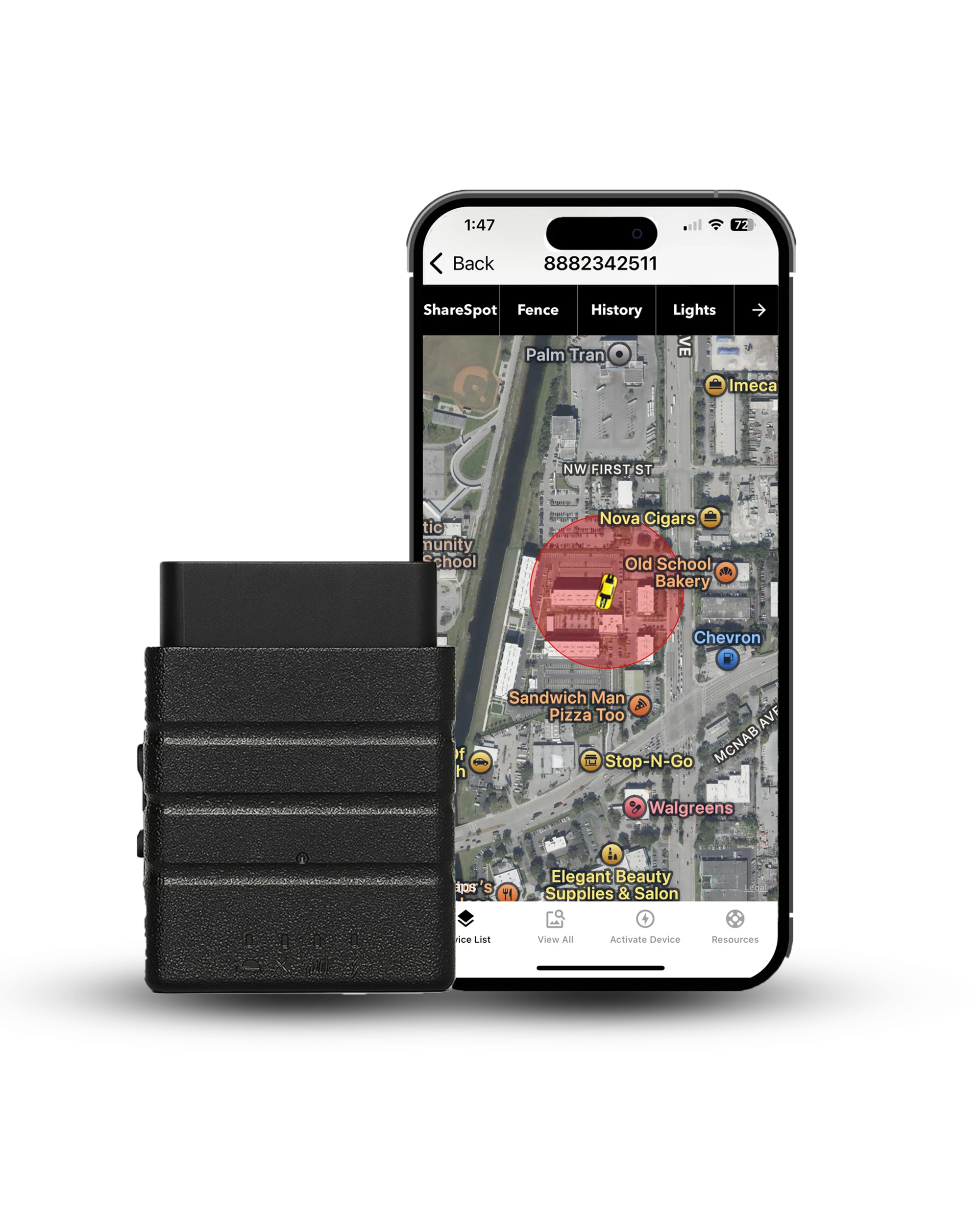
An OBD2 GPS tracker pushes into the diagnostic port under the dash, usually in under a minute and with no tools. From that point the car reports its own position. Nothing to tap, nothing to charge, and nothing that stops working because your phone died in a parking garage. Konnect updates every 3 seconds, sends speed and geofence alerts, and keeps up to a year of trip history, so the question changes from "where did I park" to "where is my car right now."
Worth understanding how a tracker differs from the phone-based tools above, our guide to personal GPS trackers covers the hardware side in more depth.
Conclusion: Pick the Tool That Matches the Problem
Losing track of your car happens to everyone, and the fix is usually free. Start with Google Maps or Apple Maps, because both are already on your phone and both do the job in a few taps. If you want the spot logged without thinking about it, a Bluetooth app such as Parkify earns its place. If you want an arrow rather than a map, Anchor Pointer or AR Car Locator will suit you better.
Just be clear about what these tools do. They remember a parking space. When you need to know where the vehicle itself is, at any moment and after it has moved, that is a hardware job rather than an app job.
The Konnect OBD2 tracker plugs into the port under your dash and reports the car's position every 3 seconds, with speed and geofence alerts and up to a year of trip history. $39.95 for the device, $8.95 a month for the unlimited plan, and a lifetime manufacturer's warranty.
 Buy on Amazon