
Best OBD GPS Tracker for Rental Cars 2026 | U.S. Guide
- 01OBD2 trackers plug in under a minute and move between rental vehicles just as fast
- 02Most trackers report once a minute, so a car covers most of a mile between pings
- 03Tracking your own rental fleet is legal, but you have to disclose it in the agreement
- 04Tamper alerts tell you the moment a renter unplugs the device
- 05Trip history settles mileage and damage disputes without relying on anyone's memory
As an Amazon Associate, Konnect GPS earns from qualifying purchases.
Best OBD GPS Tracker for Rental Cars 2026 (Turo, Fleets and Agencies)
Someone rents your car, smiles, and drives away. A few hours later, the return time passes. Calls go unanswered. Messages sit unread. Now you're left wondering where your vehicle is and when you'll get it back.
Rental car owners face this risk every day. Late returns, unauthorized trips, excessive mileage, and vehicle theft can turn a profitable rental into an expensive problem.
I'm Ryan Horban, a GPS tracking expert with more than 15 years of hands-on experience helping Turo hosts, rental agencies, and fleet operators protect their vehicles.
In this guide, I'll break down the best OBD GPS trackers for rental cars in 2026, the features that matter most, legal considerations, and the device I recommend first for protecting rental vehicles and recovering them quickly when something goes wrong.
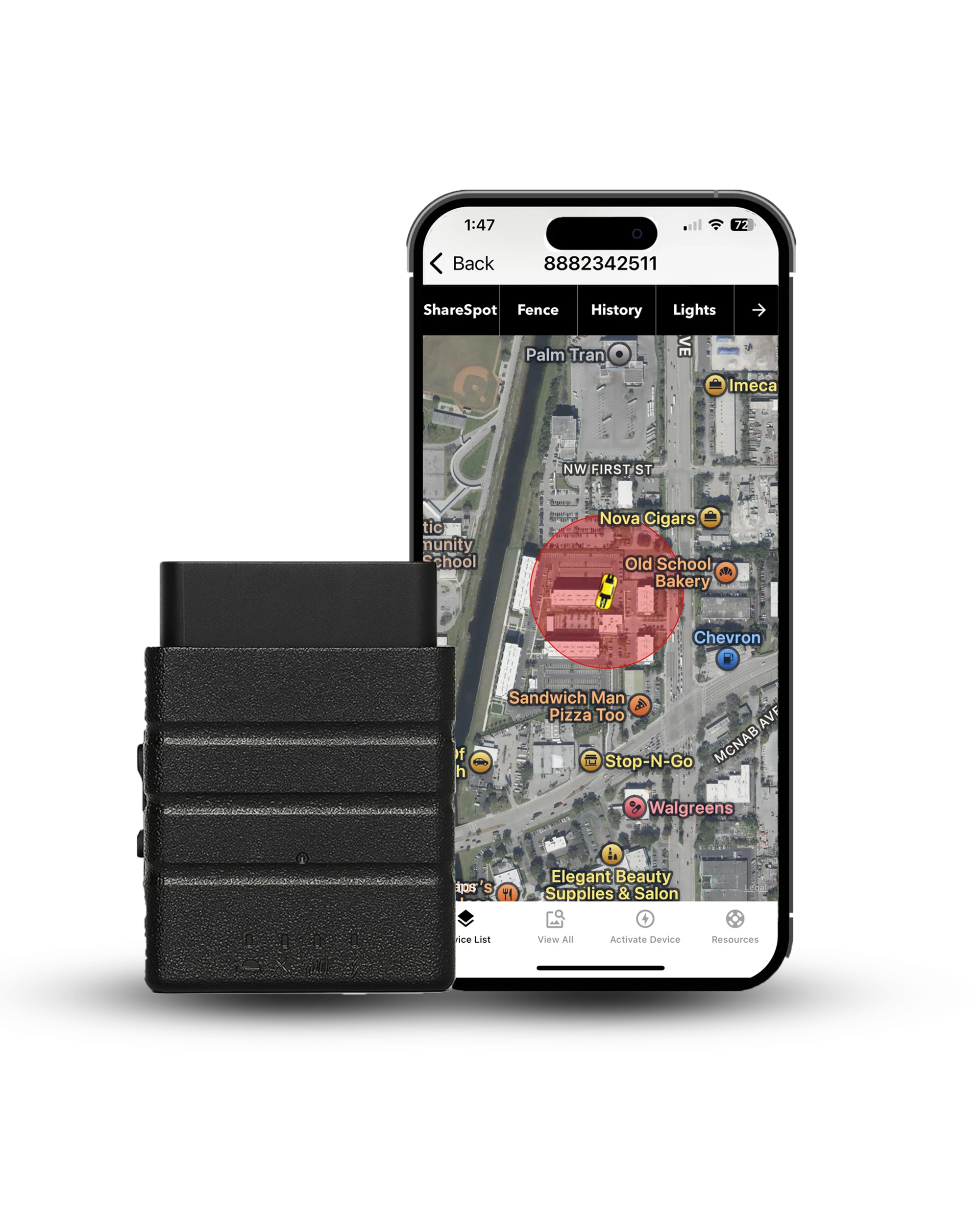
The best OBD GPS tracker for rental cars in 2026 is the Konnect OBD2 GPS Tracker. The device plugs in under 60 seconds and reports every 3 seconds against an industry norm of once a minute, which makes it the fastest and lowest-cost option for Turo hosts, small rental agencies, and independent fleet owners. Always disclose GPS tracking in your rental agreement to stay legally compliant.

Real-time position every 3 seconds, 20x the once-a-minute industry norm, on a flat plan with no contract and no prepay.
- 3 second updates
- Geofence and speed alerts
- Tamper alerts
- 1 year trip history
- Lifetime warranty
- USA based support
What Is an OBD GPS Tracker and Why Does It Work So Well for Rentals?

An OBD GPS tracker is a plug-in device that connects to the OBD2 diagnostic port found under the dashboard of virtually every U.S. vehicle manufactured after 1996. The same port that mechanics use to read engine codes. Once plugged in, it draws power directly from the vehicle, no batteries to charge, no wires to run, and immediately starts sending real-time location updates through GPS satellites and a cellular network.
OBD2 is the standardized diagnostic system fitted to U.S. passenger cars and light trucks since the 1996 model year. The 16-pin connector itself is defined by SAE J1979 and its related standards, which is why one plug-in tracker fits almost any car on a rental lot.
For rental car owners, that combination is hard to beat. Renters return cars. Some don't. Some drive further than agreed. Some push your car harder than their own. An OBD GPS tracker gives you the data to know exactly what happened, before a dispute turns into a loss.
Battery-powered GPS trackers need recharging every 1 to 3 weeks. In a rental fleet where cars turn over constantly, that means pulling the tracker, charging it, and reinstalling it, every single vehicle, every single cycle. An OBD tracker stays permanently powered through the vehicle and never needs touching between rentals.
OBD vs Hardwired vs Battery-Powered: Which GPS Tracker Works Best for Rental Cars?
Three types of GPS trackers see regular use in rental vehicles. Each solves a different problem. Choosing the wrong one costs time, money, or both.
| Tracker Type | Install Time | Power Source | Concealability | Best For |
|---|---|---|---|---|
| OBD2 plug-in | Under 60 seconds | Vehicle-powered | Visible under dash | Turo hosts, small fleets, daily rentals |
| Hardwired | 30 to 60 min, professional | Vehicle-powered | Fully hidden | Luxury vehicles, high-risk rentals |
| Battery-powered | Seconds, magnetic mount | Internal battery, needs recharging | Fully hidden | Trailers, equipment, covert backup |
For most Turo hosts and small rental operators, OBD2 is the clear choice. Setup takes less than a minute, transfers between vehicles in seconds, and runs without any maintenance. The only real tradeoff is that a renter who knows what they're doing can unplug it, which is exactly why tamper alerts matter, covered in the features section below.
Hardwired trackers make sense when you're dealing with high-value vehicles, luxury rentals, or repeat situations where renters have removed devices in the past. They require professional installation but offer permanent, hidden protection that can't be easily defeated.
Battery-powered trackers are best as a backup layer on top of an OBD device, or for trailers and equipment where no OBD port exists. They're not practical as a primary rental solution because of the recharging burden across a fleet.
8 Features That Matter in a Rental Car GPS Tracker
Most GPS trackers advertise dozens of features. For rental cars specifically, only a handful of those actually protect your business. Here's what to focus on.

-
1. Real-time update speed
This is the non-negotiable. A 60-second update interval means a vehicle traveling 60 mph moves a full mile between pings. For theft recovery or tracking a renter who's gone off route, that delay is the difference between catching a problem and chasing one. Look for trackers that update every 3 to 10 seconds.
-
2. Geofencing alerts
Set a virtual boundary around your city, region, or rental zone. The moment a vehicle crosses it, you get an instant notification. For Turo hosts who restrict travel areas, geofencing catches mileage fraud and unauthorized interstate trips before they become full-blown disputes.
-
3. Tamper and unplug alerts
Some renters will try to unplug the tracker. A device that sends an immediate alert when it loses power gives you a heads-up in seconds. Pair that with trip history and you have documentation of exactly when and where the device was removed, valuable evidence if a dispute follows.
-
4. Trip history and route replay
Real-time tracking tells you where a car is right now. Trip history tells you everywhere it went. When a renter returns a car with unexplained mileage, a mystery scratch, or a flat tire, route replay gives you the full picture without relying on their version of events.
-
5. Driver behavior monitoring
Hard braking, rapid acceleration, and harsh cornering create wear that shows up at the next service interval rather than during the rental. Useful if you want a scorecard on how renters treat the car, though it comes with a tradeoff covered further down this page.
-
6. Engine diagnostics
Some OBD2 trackers read check-engine codes and battery voltage directly from the vehicle's computer. For fleet owners managing multiple cars, that can act as an early warning system, though it depends on the device continuously querying the vehicle.
-
7. Mileage tracking and reporting
Accurate, automatic mileage logs eliminate billing disputes. If you charge per mile over an included amount, GPS-verified mileage records are far more defensible than an odometer photo a renter may contest. Clean reports also help with vehicle maintenance scheduling.
-
8. Simple subscription pricing
A tracker that costs $10 per month per car in a 20-car fleet adds $2,400 a year before you've tracked a single mile. Look for transparent monthly pricing, no setup fees, and the ability to transfer devices between vehicles without account headaches.
Why Konnect Leaves Driver Scoring and Fuel Analytics Out on Purpose
Two of the eight features above, driver behavior scoring and deep engine diagnostics, are things Konnect deliberately does not do. That is worth explaining rather than skipping past.
Pulling idle time, braking events, and fuel level means a device polling the vehicle's engine control unit continuously, on every vehicle, all day. That much polling leaves open the potential for electrical issues across a fleet. Konnect was designed and built to leave it out, because most rental operators want to know where their vehicles are and where they have been, not a per-trip driving scorecard.
What location data alone already solves for a rental business: route history that exposes unauthorized use, geofence and speed alerts, tamper alerts, and mileage records that hold up in a dispute. If you genuinely need behavior scorecards, look at a deep engine integration platform and go in knowing what that polling asks of your cars.
5 Best OBD GPS Trackers for Rental Cars in 2026
I've tested OBD2 trackers across rental cars, Turo fleets, and service vehicles. The five below earned their spots based on real-world update speed, feature depth for rental-specific use cases, and total cost of ownership across a fleet.
Konnect is the tracker I recommend first to any rental car owner or Turo host who wants fast, reliable protection without complexity. The device plugs into the OBD2 port, activates in under 60 seconds, and sends location updates every 3 seconds, the fastest refresh rate available in its price class. For a rental operator, the practical value is that a geofence breach or a late return shows up as a live position rather than a report you piece together afterward.
- 3-second real-time updates, faster than Bouncie, Vyncs, or TrackPort
- Geofence alerts, speed alerts, and tamper notifications
- Full year of trip history and route replay for dispute documentation
- Roughly 6 ft accuracy, coverage in 150+ countries
- Flat $8.95 per month, no contract and no prepay required
- Lifetime warranty with USA-based support
- Fastest update speed in class, 3 seconds against 15 to 60 seconds on competitors
- Vehicle-powered, zero charging required across the entire fleet
- Flat monthly plan with no contract and no prepay commitment
- Tamper alerts fire instantly if a renter unplugs the device
- Simple transfer between vehicles, no account changes needed
- Visible under the dashboard, not suitable for covert tracking needs
- Monthly subscription required to keep the device reporting
- OBD port placement varies by vehicle, and may sit near the driver's knee
- No driver behavior scoring, harsh braking, idle or fuel analytics
- Backup battery keeps reporting for about 15 minutes after an unplug, not indefinitely

LandAirSea SYNC is a compact OBD2 plug-in tracker built for fast, discreet installs. The Dark Mode feature disables indicator lights so renters are less likely to notice the device under the dash. As with LandAirSea's other units, the fastest 3-second refresh sits on the top SilverCloud plan tier rather than the entry tier, so check which plan you are buying. For rental owners who prioritize stealth and simplicity over diagnostic data, it's a solid runner-up.
- Dark Mode disables indicator lights for low-profile installs
- Up to a year of trip history, with ShareSpot live location sharing
- 3-second refresh on the top SilverCloud tier
- Lifetime warranty with US-based support
- Clean, straightforward mobile app
- Dark Mode hides indicator lights for a less noticeable installation
- Up to one year of trip history and route records
- ShareSpot allows live location sharing with a third party
- Lifetime warranty backed by U.S.-based customer support
- Simple mobile app that's easy to navigate
- Fastest refresh requires the top plan tier, not the entry plan
- No advanced driver behavior monitoring or driver scoring
- Limited vehicle diagnostics compared with diagnostic-focused OBD trackers
- Fewer fleet management features than rental-focused platforms
- Requires an active subscription for tracking services

Bouncie provides detailed driver behavior reports and vehicle health data that go deeper than most OBD trackers at this price. The 15-second update speed is slower than Konnect, and trip history is capped at 30 days rather than a year, but the driving summary reports, trip scores, and maintenance alerts make it a strong choice for rental owners who care more about understanding how renters treat the car than about pure real-time precision.
- Driving behavior reports covering speed, braking, and acceleration
- Vehicle health alerts for check-engine codes, battery, and maintenance
- Trip history and a driving score per trip, retained 30 days
- Crash detection with three free roadside calls a year
- $89.99 device, then $9.65 per month with no contract, dropping to $8.35 per device at three or more units
- Detailed driver behavior reports for speeding, braking, and acceleration
- Vehicle health monitoring with engine code and battery alerts
- Trip-by-trip driving scores help identify high-risk renters
- Per-device price drops at three or more units, useful for small fleets
- User-friendly mobile app with no long-term contracts
- 15-second update intervals are slower than Konnect's 3-second tracking
- Trip history is capped at 30 days, against a full year on Konnect
- Continental US only, with no international roaming for cross-border rentals
- Upfront device cost of $89.99 on top of the monthly plan
- Driver reports are more useful after a trip than during an active recovery

Vyncs bundles the device, the SIM, and a full year of service into one annual price, which removes the monthly bill entirely. The entry Basic tier updates every 60 seconds, too slow for active rental monitoring, and faster sampling sits on the Pro tier. For rental owners with smaller, lower-turnover fleets who want to budget once a year rather than monthly, Vyncs is worth considering.
- Basic 4G+ at $99.99 a year including device, SIM, and one year of service
- One-time $39.99 activation fee in year one only
- Pro 4G+ at $119.99 a year samples faster than the Basic tier
- Fuel economy tracking and full OBD2 diagnostic data
- Geofencing, speed alerts, and coverage across 200+ countries
- Device, SIM, and a year of service bundled into one annual price
- No recurring monthly bill during the included service period
- Full OBD2 diagnostics including engine codes and fuel economy data
- Geofencing, speed alerts, and unsafe driving notifications included
- Coverage extends across the U.S., Canada, Mexico, and many international markets
- Basic tier updates every 60 seconds, too slow for theft recovery
- Faster sampling requires paying up to the Pro tier
- One-time $39.99 activation fee lands on top of the first-year price
- Mobile app interface feels dated compared with newer platforms
- Less suited to high-turnover Turo rentals that need near-instant alerts

TrackPort keeps tracking straightforward, with real-time location, flexible update intervals from 5 to 60 seconds, and a built-in backup battery that keeps the device active if unplugged or if the engine cuts out. Its US, Canada, and Mexico coverage makes it a practical option for rental operators near border states or handling cross-border trips. Driver behavior reporting is limited compared with Konnect or Bouncie.
- Flexible update speed at 5, 30, or 60-second intervals
- Built-in backup battery for tamper and power-loss events
- 4G LTE coverage across the US, Canada, and Mexico
- Simple plug-and-play setup with no tools required
- Flexible reporting intervals at 5, 30, or 60 seconds
- Built-in backup battery continues tracking if the device is unplugged
- Tamper and power-loss protection adds another layer of security
- Coverage extends across the U.S., Canada, and Mexico
- Simple plug-and-play installation through the OBD2 port
- Driver behavior reporting is basic compared with Bouncie
- Limited vehicle diagnostics compared with diagnostic-focused trackers
- Mobile app and reporting tools are less polished than leading competitors
- Smaller user base means fewer third-party reviews to check against
- Higher-frequency tracking may increase service costs depending on the plan
Side-by-Side Comparison: Best OBD GPS Trackers for Rental Cars
| Tracker | Update Speed | Ongoing Cost | Tamper Alert | Driver Behavior | Best For |
|---|---|---|---|---|---|
| Konnect OBD2 | Every 3 sec | $8.95/mo flat | Yes | No, by design | Rentals, Turo, fleets |
| LandAirSea SYNC | 3 sec on top tier | Subscription required | Yes | No | Stealth and low-profile installs |
| Bouncie | Every 15 sec | $89.99 device, $9.65/mo | Yes | Yes | Driving report focus |
| Vyncs | 60 sec on Basic | $99.99/yr, plus activation | No | Yes | Low-turnover fleets |
| TrackPort OBD | 5 to 60 sec | Subscription required | Yes | No | US, Canada, Mexico trips |
Konnect OBD2 GPS Tracker reports every 3 seconds against an industry norm of once a minute, plugs in without tools, and runs on a flat $8.95 per month with no contract.
Get $10 Off KonnectHow to Install an OBD GPS Tracker in a Rental Car
Most OBD GPS trackers install in less than two minutes. You don't need tools, wiring, or professional help. Once connected, the device begins receiving power from the vehicle and can start reporting location data almost immediately.
Step 1: Locate the OBD2 Port

Every vehicle sold in the United States since 1996 includes an OBD2 diagnostic port. In most cars, you'll find it beneath the dashboard on the driver's side, close to the steering column. The port has a distinctive 16-pin trapezoid shape, making it easy to identify. Some manufacturers place it behind a small plastic cover near the fuse box.
Step 2: Connect the GPS Tracker

Insert the OBD GPS tracker directly into the port until it fits securely in place. Most devices display a small LED indicator once power is detected. If the light turns on, the tracker is connected correctly and receiving power from the vehicle.
Step 3: Activate the Tracker in the Mobile App

Download the tracking app and create or sign in to your account. Scan the QR code or enter the device ID to link the tracker to your dashboard. During testing, most OBD trackers appeared on the map within a few minutes of activation. Taking a short drive often speeds up the initial GPS connection and confirms that location reporting is working correctly.
Step 4: Configure Rental Vehicle Alerts

Before handing the keys to a renter, customize your tracking settings. Set geofence boundaries, speed alerts, and tamper notifications based on your rental policies. The entire setup process usually takes less than two minutes and provides immediate alerts if a vehicle leaves an approved area or the tracker is disconnected during a trip.
Is GPS Tracking Legal in Rental Cars? U.S. Laws and Turo Rules

Yes, GPS tracking is legal in rental cars you own in the United States. Federal law and most state laws allow vehicle owners to track their own property. Where tracking becomes illegal is when someone installs a device on a vehicle they don't own, or uses tracking to harass or stalk someone, neither of which applies to a legitimate rental operation.
Everything on this page assumes the vehicle is titled to the business installing the device. Placing a tracker on a vehicle you do not own or lease is a crime in several states, and using one to follow a person rather than protect an asset is a separate offense again. Disclose the device in writing before the keys change hands, and if you are unsure of the rules where you operate, speak with an attorney.
The Disclosure Requirement
You don't need lengthy legal language. One sentence in your rental agreement covers it:
This vehicle is equipped with a GPS tracking device for security, theft recovery, and fleet management purposes. Location data may be monitored during the rental period.
That language mirrors what the major rental agencies include in their agreements. A renter who signs acknowledges the tracker is there. That disclosure protects you legally and eliminates any claim of hidden surveillance.
Turo-Specific Rules
- GPS and cellular trackers are allowed. Turo's vehicle tracking and technology policy permits GPS, telematics, and OEM tracking devices, subject to disclosure.
- AirTags and Bluetooth-only trackers are banned. Turo prohibited Apple AirTags, Tile, Samsung SmartTags, and similar Bluetooth devices as of January 31, 2025, citing unreliability and guest experience. The operative word in the policy is cellular.
- You must disclose to the guest. Hosts are required to inform the approved driver and passengers of the data being collected. Most hosts handle this with a templated message at booking plus a line in the listing description.
- In-cabin recording is a stricter category. Audio or video recording inside the vehicle requires separate written guest consent through Turo messaging, not just disclosure.
- Vehicles worth $125,000 or more must have the manufacturer's own OEM tracking activated under Turo's host requirements. An aftermarket OBD device does not substitute for that, though you can run one alongside it.
- Some states have stricter rules. California in particular has additional consent requirements around telematics. Turo's policy does not replace state law.
The practical approach that works for most Turo hosts: add a single line to your listing description and a matching clause in your rental agreement. That covers Turo's tracking policy requirement and satisfies disclosure obligations under virtually every U.S. state law at the same time.
States With Stricter GPS Tracking Rules
Most states follow federal property-owner standards. A few impose additional requirements worth knowing if you operate there.
| State | Key Consideration | Action for Rental Owners |
|---|---|---|
| California | Strong consumer privacy laws, and telematics data collection may require explicit notice | Written disclosure in the rental agreement, stating clearly what data is used for |
| Texas | Tracking a vehicle without the owner's consent is a criminal offense | Fine for your own fleet, but make sure the agreement is signed before keys change hands |
| All other states | Owner tracking is generally permitted with reasonable notice | A standard one-sentence disclosure in the agreement covers most situations |
The disclosure line costs you nothing and settles the legal question permanently. The hosts who get into trouble are almost never the ones who tracked. They're the ones who tracked quietly.
What Does GPS Tracking Actually Save a Rental Business?
The business case for GPS tracking in rental cars goes well beyond theft prevention. Fleet operators who track consistently report savings across four categories.

-
Theft recovery
A tracker does not recover the car by itself. What it changes is the report you can file: instead of describing a missing vehicle, you give law enforcement a live location within minutes of noticing. On a rental, where the gap between "late" and "gone" can be a full day, that head start is the whole value.
-
Mileage billing accuracy
GPS-verified mileage records are exact and timestamped. Renters who dispute overage charges can't argue against a log showing every mile driven with route playback. For operations that charge per mile, this often recovers more than the subscription cost on its own.
-
Unauthorized usage reduction
Geofence and after-hours alerts catch renters who take vehicles outside agreed regions or return late without contact. Early intervention before a situation escalates is far cheaper than pursuing a claim after the fact.
-
Insurance considerations
Some insurers offer fleet premium reductions for documented telematics installation, and Turo's own off-trip insurance program lists approved GPS devices. Worth a direct conversation with your provider before your next renewal rather than an assumption.
For a 5-car fleet on Konnect, the arithmetic is straightforward: 5 devices at $39.00 is $195 up front, and $8.95 per month per car comes to $537 a year in service. Against that, a single avoided theft, a single recovered mileage overage, or one late return caught early can cover the annual cost several times over. Run the numbers against your own loss history rather than an industry average.
Conclusion
OBD2 GPS trackers are the most practical solution for rental car owners in 2026. They install in under 60 seconds, require no charging across an entire fleet, and give you real-time visibility into every vehicle every time a renter drives away.
For most Turo hosts and small rental operators, Konnect OBD2 is the strongest choice: faster updates than any competitor in its price class, a flat plan with no contract, and the alerts that actually matter on a rental, which are geofence, speed, and tamper. What it deliberately leaves out is driver scoring and fuel analytics, and for most rental operators that trade is the right one.
Disclosure is non-negotiable. One sentence in your rental agreement covers you legally in almost every U.S. state. Add it now, before your next rental goes out. Once that's done, the tracker does the rest, and your cars stop disappearing into the unknown.
Konnect OBD2 plugs in once and reports every 3 seconds, 20x the once-a-minute industry norm, with geofence, speed, and tamper alerts on a flat monthly plan and a lifetime warranty.
Some images in this article were generated using AI.
About the Author

 Buy on Amazon